
Classic Power Menu icon

Classic Power Menu

Classic Power Menu is a Power Menu Replacement for Android 11+, with the main aim being restoring power menu options (Device Controls & Quick Access Wallet) on Android 12.

Classic Power Menu screenshot 1

Cost / License

Platforms

  • Android  Android 11+
1like
0comments
0articles

Features

  1.  Root required

Classic Power Menu News & Activities

Highlights All activities

Recent activities

Classic Power Menu information

  • Developed by

    KieronQuinn
  • Licensing

    Open Source (Apache-2.0) and Free product.
  • Alternatives

    1 alternatives listed
  • Supported Languages

    • English

AlternativeTo Category

System & Hardware

GitHub repository

  •  766 Stars
  •  27 Forks
  •  8 Open Issues
  •   Updated  
View on GitHub

Popular alternatives

View all
Classic Power Menu was added to AlternativeTo by Emin on and this page was last updated .
No comments or reviews, maybe you want to be first?

What is Classic Power Menu?

Classic Power Menu is a Power Menu Replacement for Android 11+, with the main aim being restoring power menu options (Device Controls & Quick Access Wallet) on Android 12.
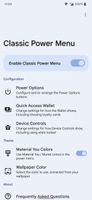
Features: Up to 10 power options in the Power Menu, including the non-stock options of Screenshot, Reboot Recovery and Reboot Bootloader

Fully customisable, including rearranging and hiding buttons you don't use Quick Access Wallet in the Power Menu, accessible while locked or unlocked

Optional blurring of card numbers while locked Optional showing of loyalty cards, restoring a previous feature from Android 10 which was removed. Loyalty cards' codes can be shown while locked and without needing to open Google Wallet, if you wish. Device Controls in the Power Menu, accessible while locked or unlocked

Optional ability to interact with controls while locked, without requiring authentication Material You inspired theme, using Monet colours and background blur on the Power Menu

Xposed is not required, interception of the power button is done via Accessibility Service, with only normal root required

An optional Xposed module is included, which can react quicker than the Accessibility Service

Official Links