Chronoface icon
Chronoface icon

Chronoface

Free and open-source analog watch face screensaver for macOS with 16 dial themes, a luminescent night mode and live weather.
Chronoface screenshot 1

Cost / License

  • Free
  • Open Source (MIT)

Platforms

  • Mac  Requires macOS 13 Ventura or later. Distributed as a signed and notarized .pkg from the official website (GitHub Releases), not via the Mac App Store.
0likes
0comments
0articles

Features

Chronoface News & Activities

Highlights All activities

Recent activities

Chronoface information

  • Developed by

    UA flagSerhii Perekrestov
  • Licensing

    Open Source (MIT) and Free product.
  • Written in

  • Alternatives

    3 alternatives listed
  • Supported Languages

    • English

AlternativeTo Category

OS & Utilities

GitHub repository

  •  2 Stars
  •  0 Forks
  •  0 Open Issues
  •   Updated  
View on GitHub
Chronoface was added to AlternativeTo by Serhii-Perekrestov on and this page was last updated .
No comments or reviews, maybe you want to be first?

What is Chronoface?

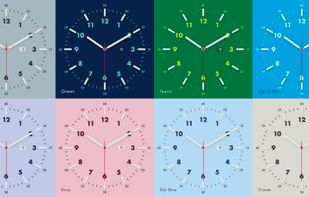
Chronoface is a free, open-source (MIT) screensaver for macOS that displays an analog watch face inspired by classic Swiss dial design.

It ships 16 dial themes with matched hands, tick marks and numerals, and three second-hand movement styles: smooth quartz sweep, mechanical tick and digital. A luminescent night mode offers 14 glow colors with adjustable intensity; in auto mode the switch between day and night follows the local sunrise and sunset, computed offline with NOAA solar algorithms. Optional complications include a date window and live weather with time for 22 world cities. A custom background mode can use any image or the current desktop wallpaper with adjustable dimming.

The installer is a signed and notarized universal .pkg (Intel and Apple Silicon) for macOS 13 Ventura and later: on Sonoma and newer it installs a modern app with a screensaver extension, on Ventura a legacy .saver bundle. Settings live in the companion Chronoface app. There is no paid version, no subscriptions, no ads and no tracking; the clock works fully offline except the optional weather complication.

A web demo on the official site runs the same dial geometry in the browser, so the screensaver can be tried before installing.

Official Links
