Lost that perfect ChatGPT answer from three weeks ago?
Every day you get great answers from your AI chat tools — then lose them in an endless scroll of chat history. ChatLodge fixes that. Save any AI answer in one click, and find it later by meaning, not keywords — entirely on your device, with no account required.
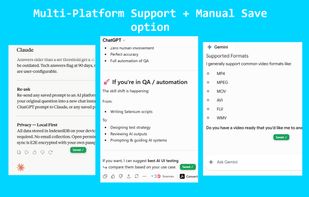
Currently supported: ChatGPT, Claude, and Gemini — plus other popular AI chat platforms.
HOW IT WORKS
-
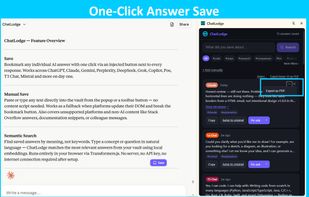
SAVE — ChatLodge adds a Save button inline on every supported chat platform. When you read an answer worth keeping, click Save. That's it.
-
INDEX — A local AI model runs entirely in your browser and generates a semantic index of your saved answers. No API key, no external server, no data leaves your device. A local AI model — bundled right inside the extension, which is why the download is a little larger than a typical extension — runs entirely in your browser…
-
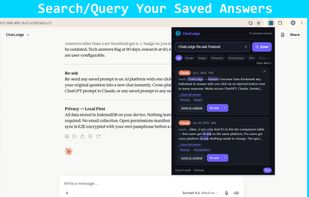
SEARCH — Open the ChatLodge popup or side panel and ask in plain language: "how did I set up that Redis connection?" or "what was that Python trick for parsing dates?" ChatLodge finds the right answer by meaning, even if the words don't match exactly.
One vault, all your AI tools — so you're not stuck hunting through a dozen separate chat histories.
FEATURES
ONE-CLICK SAVE
A Save button appears inline on every supported platform. Capture any answer without interrupting your flow. You can also save custom entries manually — paste any text you want to keep, from anywhere.
SEMANTIC SEARCH, FULLY ON-DEVICE
Search your saved answers by meaning, not just keywords. The embedding model runs locally in your browser — no API key, no server, no cost per query.
AUTO-TAGGING
Every saved answer is automatically tagged by topic (code, research, writing, and more). Tags appear instantly, with no configuration needed.
STALENESS ALERTS
AI answers go out of date. ChatLodge tracks how old your saved answers are and flags ones on fast-moving topics — tech (90 days), research (60 days), general (180 days) — so you know when to re-ask.
SIDE PANEL + POPUP
Access your vault from the popup or pin the side panel for a permanent knowledge sidebar while you browse. Search, browse by tag, and re-ask without leaving your current tab.
QUICK PASTE (keyboard shortcut)
Alt+Shift+S opens a Quick Paste panel anywhere — paste any text to save it to your vault instantly, without switching tabs.
EXPORT TO PDF
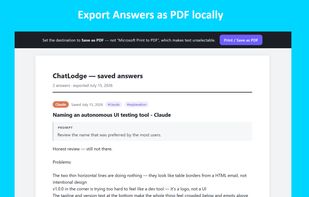
Turn saved answers into clean, shareable PDF documents. Export a single answer, your current search results, or a hand-picked selection — tick the answers you want and export them together.










 Sanora Technologies
No comments or reviews, maybe you want to be first?