
ChatGPT Pro Tools icon

ChatGPT Pro Tools

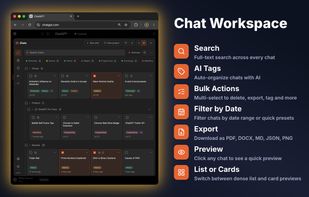
Replaces ChatGPT's Recents with a full-screen panel — search, filters, bulk actions, saved messages, highlights, notes, export, prompt manager — and AI Tags that organize your whole history by topic in one click.
ChatGPT Pro Tools screenshot 1

Cost / License

  • Freemium (Subscription)
  • Proprietary

Platforms

  • Google Chrome
  • Mozilla Firefox

Features

Properties

  1.  AI-Powered

Features

  1.  Browser extension

ChatGPT Pro Tools News & Activities

Highlights All activities

Recent activities

ChatGPT Pro Tools information

  • Developed by

    Nikita
  • Licensing

    Proprietary and Freemium product.
  • Pricing

    Subscription that costs $5 per month + free version with limited functionality.
  • Alternatives

    4 alternatives listed
  • Badge

    Get an embeddable badge for ChatGPT Pro Tools
  • Supported Languages

    • English
    • Russian
    • Ukrainian
    • German
    • Spanish
    • French
    • Hindi
ChatGPT Pro Tools was added to AlternativeTo by nikita-suiazov on and this page was last updated .
No comments or reviews, maybe you want to be first?

What is ChatGPT Pro Tools?

ChatGPT's own Recents list is fine for a handful of chats. ChatGPT Pro Tools replaces it with a full-screen workspace built for a history of hundreds or thousands: find any chat by its text, filter and sort it, clean it up in bulk, and keep the parts that matter — saved replies, highlighted passages and notes — in one place. It all lives inside the normal ChatGPT interface, and nothing about ChatGPT itself changes.

CHAT WORKSPACE • Search the full text of all your chats, with matching snippets highlighted • Filter by date (today, last 7 days, last 30 days or a custom range) and by tag • Select several chats at once and delete, archive, pin, move to a project or export them together • Rename, pin, share, tag or delete a single chat from its menu • Sort by date, title or number of messages, and switch between list and card view

TAGS • Give chats colour-coded tags and filter by them in the workspace and in the sidebar • Automatic tagging is available too: the extension suggests topic tags based on your own chats, you approve them, and new chats are tagged for you (this uses the AI features described below)

EXPORT AND DOWNLOAD • Save a chat as PDF, Word document, Markdown or plain text • Export a whole project, or several chats in one go • Choose only the messages you need before exporting or sharing • Download all images from a chat as a single ZIP file • Copy a whole conversation to the clipboard and keep the formatting when you paste it • Save any answer as an audio file

PROMPT MANAGER • Store the prompts you use often and insert them by typing "/" in the message box • Use fill-in-the-blank placeholders inside a prompt • Keep prompts in folders, search them, or pick one from the community library

EVERYDAY HELPERS • Dates next to every chat in the sidebar and a header that stays visible while you scroll • A live character and word counter in the message box • Collapse long messages, and see the time and size of each message

Available in English, Russian, Ukrainian, German, Spanish, French and Hindi.

ChatGPT Pro Tools Videos