
CastReader icon
CastReader icon

CastReader

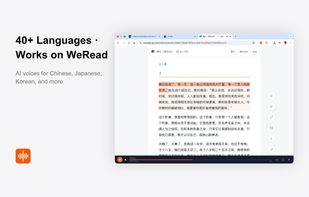
AI read-aloud browser extension that also explains what you're reading in your own language — and works on Kindle Cloud Reader and WeRead, where other TTS tools fail.
CastReader screenshot 1

Cost / License

  • Free
  • Proprietary

Application type

Platforms

  • Google Chrome

Features

Properties

  1.  Lightweight
  2.  Privacy focused

Features

  1.  Text to Speech
  2.  No Tracking
  3.  Extensible by Plugins/Extensions
  4.  No registration required
  5.  Ad-free
  6.  Read Aloud

CastReader News & Activities

Highlights All activities

Recent activities

  • vinxu updated CastReader
  • ListenDock icon
    jan-software added CastReader as alternative to ListenDock
  • EbookAloud icon
    calberty added CastReader as alternative to EbookAloud
  • OpenReader icon
    phisch added CastReader as alternative to OpenReader
  • vinxu reviewed CastReader  

    I've tried Speechify, NaturalReader, and Read Aloud. They all fail on the same thing — Kindle Cloud Reader. The text is rendered with custom font glyphs so every other extension just returns blank.

    CastReader actually reads it. I don't know how they did it but it works. Press the extension icon on read.amazon.com and it starts reading with paragraph highlighting. Same with WeRead which renders everything on Canvas.

    For regular web pages it's also the cleanest extraction I've used. It...

  • vinxu added CastReader
  • vinxu liked CastReader
  • App icon
    vinxu added CastReader as alternative to Speechify, ElevenReader and Read Aloud Extension

CastReader information

Our users have written 1 comments and reviews about CastReader, and it has gotten 1 likes

CastReader was added to AlternativeTo by vinxu on and this page was last updated .

Comments and Reviews

   
vinxu
0

I've tried Speechify, NaturalReader, and Read Aloud. They all fail on the same thing — Kindle Cloud Reader. The text is rendered with custom font glyphs so every other extension just returns blank.

CastReader actually reads it. I don't know how they did it but it works. Press the extension icon on read.amazon.com and it starts reading with paragraph highlighting. Same with WeRead which renders everything on Canvas.

For regular web pages it's also the cleanest extraction I've used. It strips out nav bars and ad blocks before reading. Other tools read "TRENDING NOW" and "SIGN UP FOR NEWSLETTER" before getting to the article. CastReader skips all that.

The free tier gives 30 minutes a month which is enough for casual use. Voice quality is good, not Speechify-premium level, but natural enough. Speed control works well at 1.5x.

Only downside: no mobile app. Chrome/Edge/Firefox/Safari only. If you mostly read on desktop this is the best option I've found.

Review from a new or low-activity account — shown here, but not counted in the app rating.

Official Links

What is CastReader?

CastReader reads webpages, PDFs, EPUBs, DOCX files, images and Kindle Cloud Reader books aloud with real-time paragraph highlighting. It can also explain a difficult or foreign-language passage in the language you choose, while keeping the original text visible on the page.

It intelligently extracts article content, stripping away navigation bars, ads, and sidebars, so you hear the actual content — not the clutter.

What makes CastReader unusual is support for platforms most TTS tools cannot handle. Kindle Cloud Reader renders text using custom font subsets that appear as unreadable glyphs in the DOM — CastReader uses OCR-based glyph decoding to extract the real text. WeRead, one of China's largest reading platforms, renders everything on Canvas with no text in the page — CastReader intercepts chapter data before it reaches the Canvas.

Key features:

  • Reads any supported webpage with one click, highlights the current paragraph and auto-scrolls
  • Read & Explain: Overview, Standard and Deep modes for papers, books, reports, contracts and technical manuals — explanation appears alongside the source, it does not replace it
  • Works on Kindle Cloud Reader, WeRead, Notion, Google Docs, ChatGPT, Claude, Gemini, Substack, Gmail, Yuque, Feishu and more
  • Document reading for PDF, DOCX, EPUB, screenshots and pasted text
  • Click any paragraph to continue from that position; adjustable playback speed and voice

Reading languages: CastReader reads aloud in 9 languages — English, Mandarin Chinese, Japanese, Spanish, French, German, Brazilian Portuguese, Italian and Hindi. Content language is detected automatically. Read & Explain works across a wider set of languages, since it explains rather than narrates.

Free and Pro: CastReader is free to start with daily allowances — currently 20 minutes of read-aloud and 3 AI Explains per day. CastReader Pro raises those limits and adds premium voices and faster playback. Current limits and prices: https://castreader.com/pricing

Available on: iPhone and iPad, Android, Chrome, Edge, and Firefox. Desktop browser reading uses the Chrome or Edge extension.

Boundaries: CastReader does not bypass DRM, paywalls, subscriptions, or publisher restrictions — it reads content you can already access. Not every website, file, language, or book will work. Read & Explain is a reading aid, not certified translation or professional advice. CastReader is independent and is not affiliated with Amazon or Kindle. Amazon and Kindle are trademarks of Amazon.com, Inc. or its affiliates.

CastReader Videos