Canvas Downloader is the best way to download all your Canvas course files to your PC and keep your folders up to date - organized, offline, optimized for AI and ready to study.
DOWNLOAD EVERY COURSE AT ONCE
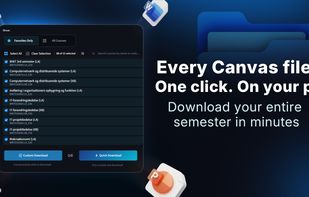
Tick the courses you want and the app pulls all of them. You can download EVERYTHING from canvas: lecture slides, readings, module files, the syllabus, assignments, announcements, discussions, quizzes, and the feedback on your own assignments, including files and information hidden behind links in your canvas pages.
Folders come out organized the way your courses are, or all in one folder if you prefer. Use Custom Download mode for full control of what to download, or use Quick Download and its five ready-made presets to download Canvas courses quickly in just two clicks.
SYNC INSTEAD OF STARTING OVER
After downloading, use the intelligent Sync mode later to download only new or changed files. Quick Sync is one click. Sync Review compares your course folder to your Canvas course and shows you exactly what is different - all before anything is written - sorted into new files, updates, files you edited, files you deleted, and files your teacher removed. For students who want the full overview, perfect before exam season.
Canvas Downloader never overwrites a file you edited, never touches documents you have open, and it never deletes anything of yours - your files are safe.
AUTO-SYNC EVERY MORNING
Switch on daily sync and pick your courses. From then on, the first time you open the app each day, it quietly fetches everything new. The Today page shows exactly what arrived, grouped by course, with buttons to open the downloaded files straight from the app.
READY FOR NOTEBOOKLM AND OTHER AI TOOLS
Turn on AI optimization and the app converts files as it downloads them: PowerPoint and Excel to PDF, Canvas pages to plain text, archives unpacked, video to audio, and more. A fully AIoptimized course folder can be dragged straight into NotebookLM, and files will be optimized for use in ChatGPT, Claude or Gemini.
LECTURE RECORDINGS AND TRANSCRIPTS
Courses that post lectures through Panopto can be saved straight into your course folder as video (MP4), audio (MP3), a plain-text transcript, subtitles (SRT), or a shortcut back to the original recording. Transcription runs on your own computer, so nothing is uploaded and it costs nothing.
PRIVATE BY DESIGN
No account. No server. No analytics. No telemetry. Nothing is uploaded anywhere, ever. You sign in with an access token you create yourself in your own Canvas settings, which is stored safely, and it is only ever used to talk directly to your own university's Canvas. The app reads only what your own Canvas account can already open.
FREE AND OPEN SOURCE
Built by a student, for students, given away to all. Used by students in 100 countries.
Canvas Downloader is an independent project and is not affiliated with, endorsed by, or connected to Instructure, Inc. or Canvas LMS.



 EU
EU


 BrkBuilds


No comments or reviews, maybe you want to be first?