CallPrompter icon
CallPrompter icon

CallPrompter

Always know the next question to ask. Always have the perfect response to objections. CallPrompter gives you an invisible advantage on every call.

Real-time invisible prompts during a live sales call. Your prospect never sees them, not in screen shares, not in recordings.

Cost / License

  • Subscription
  • Proprietary

Platforms

  • Online  Requires stable internet for real-time transcription and AI coaching.
  • Windows  Windows 10+
  • Mac  macOS 13.0+ (Ventura or later). Direct download from callprompter.app, not available on the Mac App Store.
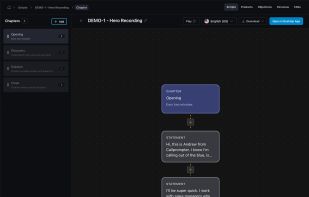
Visual script editor with branching logic. Build conversation flows with objection handling, discovery questions, and transition triggers.
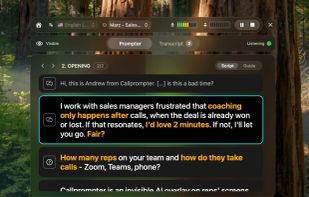
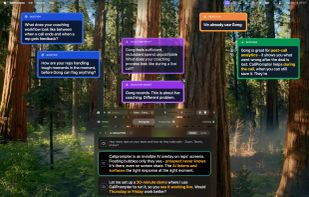
Floating coaching cues appear over any calling app. Zoom, Teams, Meet, or phone. Click-through so nothing blocks your workflow.
+1
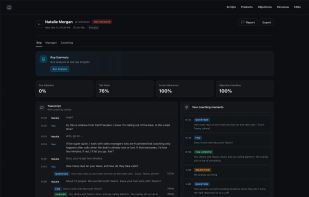
Three-perspective post-call analysis. Review every call from the rep, manager, and coaching angle with AI-powered insights.
0likes
0comments
0alternatives
0articles

Features

CallPrompter News & Activities

Highlights All activities

Recent activities

CallPrompter information

  • Developed by

    Unknown
  • Licensing

    Proprietary and Commercial product.
  • Pricing

    Subscription ranging between $99 and $249 per month.
  • Alternatives

    0 alternatives listed
  • Supported Languages

    • English
    • German
    • Spanish
    • French
    • Italian
    • Chinese
    • Portuguese
    • Turkish
CallPrompter was added to AlternativeTo by callprompter on and this page was last updated .
No comments or reviews, maybe you want to be first?

What is CallPrompter?

CallPrompter is a native desktop app (Mac & Windows) that acts as a real-time sales coach during live calls.

It listens to conversations, transcribes them instantly, and matches what’s being said against your scripts, objection handling, and product knowledge using AI. Instead of guessing what to say next, reps get precise, in-the-moment guidance.

When needed, subtle on-screen cue cards appear with the right question, objection response, or talking point. Because they’re rendered using native OS APIs, they remain completely invisible in screen shares and recordings.

Cue cards can surface: • Smart questions to move the deal forward • Objection responses • Knowledge base answers • Upsell and cross-sell opportunities • Coaching signals like “stop pitching features” or “ask for the meeting”

Sales teams build structured, branching scripts in a visual editor. The system tracks the conversation in real time and automatically follows along — no rigid teleprompter, no forced reading. Reps speak naturally while the system adapts.

After each call, CallPrompter generates a multi-angle analysis: • Rep view for self-review • Manager view for coaching • Coach view for deeper performance insights

Call outcomes and key discovery data are captured automatically and can be pushed into your CRM or reused in future conversations.

Built for B2B sales teams running phone or video calls. Works seamlessly with Zoom, Google Meet, Microsoft Teams, and any softphone.

CallPrompter Videos

Official Links