

Burst Notes
Native macOS quick-capture utility that inserts notes from any app directly under a chosen heading in an existing Markdown file.
Cost / License
- Pay once
- Proprietary

Platforms
- Mac

Burst Notes
Features
- Dark Mode
- No Tracking
- Ad-free
- Live Preview
- Works Offline
- Hierarchical Structure
- WYSIWYG Support
- No Coding Required
- Support for MarkDown
Burst Notes information
What is Burst Notes ?
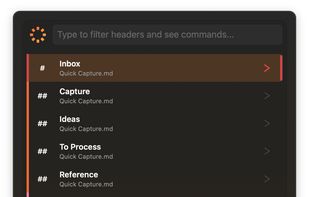
Burst Notes is a native macOS quick-capture utility for people who already keep notes, project plans, research or tasks in Markdown. Press a global keyboard shortcut, search your Markdown files and their heading hierarchy, choose a destination, type your note and return to work.
The text is inserted directly under the selected heading in a standard Markdown file, rather than being collected in a separate inbox or proprietary database. Burst Notes works with Obsidian vaults and files edited in VS Code, Zettlr, iA Writer and other Markdown editors.
Features include keyboard-only navigation, smart ranking of frequently used headings, GitHub-style task capture, visual and source Markdown editing, offline operation, a fully functional 14-day trial, and no account or telemetry.