
BudgetWise AI icon
BudgetWise AI icon

BudgetWise AI

 1 like

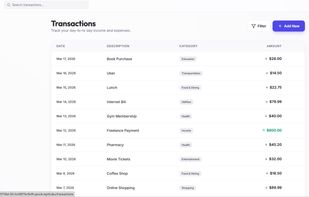
Description: > BudgetWise AI is a modern personal finance assistant designed to help users master their cash flow through intelligent analysis and a privacy-first approach. Developed by josephnathanie, the app provides a native Windows experience for tracking expenses and...
BudgetWise AI screenshot 1

Cost / License

  • Freemium
  • Proprietary

Application type

Since

  • Since 2026

Platforms

  • Windows
  • Online
1like
0articles
Save

Features

Properties

Features

Highlights All activities

BudgetWise AI News & Activities

Recent activities

BudgetWise AI information

  • Developed by

    US flagJosephNathanie
  • Licensing

    Proprietary and Freemium product.
  • Pricing

    free version with limited functionality.
  • Alternatives

    4 alternatives listed
  • Badge

    Get an embeddable badge for BudgetWise AI
  • Supported Languages

    • English

Our users have written 1 comment or review about BudgetWise AI, and it has gotten 1 like.

BudgetWise AI was added to AlternativeTo by nathanielimrn on and this page was last updated .

Comments and Reviews

   
nathanielimrn
1

Very easy to use and fun because of the voice command feature!!

What is BudgetWise AI?

Description: > BudgetWise AI is a modern personal finance assistant designed to help users master their cash flow through intelligent analysis and a privacy-first approach. Developed by josephnathanie, the app provides a native Windows experience for tracking expenses and auditing spending habits.

Voice Log Technology: A standout feature is the integrated Voice Log, allowing for hands-free transaction entry. Simply speak your expenses in natural language, and the AI parses them into categorized entries instantly.

Audit & Insights: The app includes a dedicated Budget Auditor to scan transaction lists for discrepancies, ensuring your records are accurate and optimized.

Cross-Platform PWA: Beyond the Microsoft Store, BudgetWise AI is fully installable on mobile devices. To install on Mobile: Open the official website URL, tap 'Options' (the three dots/share icon), and select 'Add to Home Screen' to install.