Safety-first, open-source data recovery for Windows 10/11. Deleted a file? Formatted a card? Drive failing? Get your data back — without making things worse.
Part of the BitBroom family · no ads · no telemetry · no "activate to recover" ransom screens
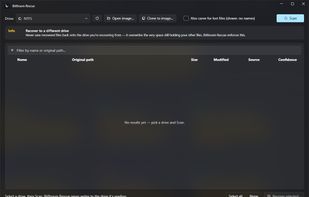
Deleted documents, formatted SD cards, failing drives — BitBroom Rescue recovers them on one rule: the drive being recovered is opened read-only, always. The I/O layer physically has no write path. No ransom screens. No fake green flags.
Every way back, in one tool
From “it's in the Recycle Bin” to “the drive is clicking” — Rescue covers the whole spectrum, and tells you honestly which one you're in.
NTFS undelete
Full MFT walk: deleted records, original folder paths reconstructed, resident and fragmented data followed through runlists. A real system drive scan enumerates 950k+ deleted files in seconds — read-only.
USB sticks & SD cards
FAT32 and exFAT engines recover deleted camera photos, dashcam clips and documents — long filenames stitched back together from what survives on disk, timestamps preserved.
Recycle Bin & previous versions
Parses the Bin's $I/$R records for original paths and deletion times, and surfaces Volume Shadow Copy snapshots — the two highest-confidence recoveries, checked first.
Carving for formatted media
When the file system is gone, signatures find the files: JPEG, PNG, HEIC, PDF, ZIP/DOCX, MP4/MOV (box-aware sizing for multi-gigabyte videos), MP3, RAR, SQLite and more — every hit validated before you see it.
Failing drive? Clone first
ddrescue-style two-pass imaging: grab everything readable fast, retry the bad spots gently, map what's lost — then recover from the image so the dying drive is stressed exactly once. Validated on a real drive that died mid-clone.
Honest confidence, honest health
Every file is scored High / Good / Fair / Poor with the reason. SMART and TRIM are checked up front — on a TRIMmed SSD it tells you deleted content is likely gone instead of selling you a “deep scan” of zeros.







 TheEmperorArt added Bitbroom.Rescue as alternative to Recuva, Glary Utilities, Disk Drill and R-Studio


 pwnapplehat

No comments or reviews, maybe you want to be first?