



Better Search
Better Search is a Chrome extension that improves your search experience whether you use Google, Bing, Yahoo, Baidu, or Yandex.
Cost / License
- Free
- Proprietary
Alerts
- Discontinued
Platforms
- Mac
- Windows
- Linux
- Google Chrome
The extension has been completely removed from Chrome Web Store.

Features
- Website blocking
- Preview links
Tags
- preview-files
- Highlight
- Search Engine
- search-by-image
- blocklist
- blacklist
- find-words
- Google Chrome Extension
Better Search News & Activities
Recent activities
Better Search information
Developed by
UnknownLicensing
Proprietary and Free product.Alternatives
2 alternatives listedSupported Languages
- English


Featured in Lists

A list with 145 apps by Nemets39 without a description.
What is Better Search?
Better Search is a Chrome extension that improves your search experience whether you use Google, Bing, Yahoo, Baidu, or Yandex.
-
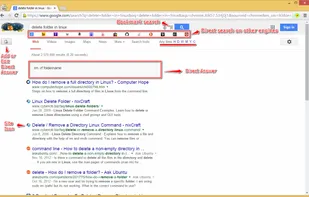
Preview the search result links without opening new tabs. The terms you searched for are automatically highlighted with each keyword highlighted in a different color. Easily find the search term by clicking on the marker next to the scrollbar.
-
Make same search on other search engines with a single click.
-
Easily identify results from familiar sites by the site icon next to the results. Clicking on the site icon will show relevant results from that site only.
-
Easily identify the results you've found useful in your regular search results. Browse or search through your favorite results.
-
Star any result item - similar to a regular bookmark but better.
-
Block any number of sites or pages. Results from those sites or pages are automatically hidden yet they are only a click away.
-
Add a note associated with the search. Good for instant answers. For example, use it when you are looking up reference information such as HTML syntax.
-
Annotate any page and see the annotations in your search results or whenever you visit the page. You can add a note to the top of the page or you can highlight text and add notes pertinent to the highlighted text. If the annotated page is part of the results in subsequent searches, the highlighted text is included right in the results page. Great for researching a topic or any situation similar to where you would highlight passages in a book.
-
Easily search through your annotations
-
Select some text on a web page and conduct a web search on your favorite search engine using the context menu.
-
Visual indicator to show if any of the result has been bookmarked by you.
-
Moving mouse over previously visited link shows you how many times you've visited it previously and the time of your last visit to the page.
-
Reverse image search.
-
Preview PDF & Office documents.
Official Links
There are no links for this app, or they've been disabled.