


Batch ISO Creator
4 likes
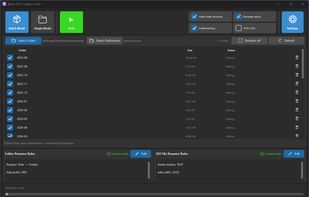
Batch ISO Creator is a Windows app for creating ISO files from folders with Batch Mode, Folder Mode, renaming rules, ISO Mounting, and an ISO Library.

Cost / License
- Freemium (Pay once or Subscription)
- Proprietary
Application typeApplication types
Platforms
- Windows


Features
Highlights All activities
Batch ISO Creator News & Activities
Recent activities
- Danilo Moreira updated Batch ISO Creator
- augustwilldecay liked Batch ISO Creator
This is the absolute best iso creation software that I am aware of, it's also the only one that has a mode to cue up piles of jobs that complete one after the other without having to babysit the software; this is a huge time saver preventing the need to sit there and let one finish, load the next one, let it finish and so on. Because of this feature this software is by far the best available. With its modest price and robust features there's no reason to look for any other iso conversion...
- Danilo Moreira updated Batch ISO Creator
- ravioldev liked Batch ISO Creator
great for creating isos in batch, it works pretty well
- joseline liked Batch ISO Creator
Developed by
raviol.devLicensing
Proprietary and Freemium product.Pricing
One time purchase that costs $60, and / or subscription ranging between $3 and $20 per month + free version with limited functionality.Alternatives
21 alternatives listedBadge
Get an embeddable badge for Batch ISO CreatorSupported Languages


Comments and Reviews
This is the absolute best iso creation software that I am aware of, it's also the only one that has a mode to cue up piles of jobs that complete one after the other without having to babysit the software; this is a huge time saver preventing the need to sit there and let one finish, load the next one, let it finish and so on. Because of this feature this software is by far the best available. With its modest price and robust features there's no reason to look for any other iso conversion softwares. Here you have landed on the one that does what no other iso conversion software does. Buy it!
great for creating isos in batch, it works pretty well