
Backtalk icon
Backtalk icon

Backtalk

Backtalk is a note-taking app in self-chat and microblogging UI format.
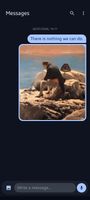
Backtalk screenshot 1

Cost / License

  • Free
  • Open Source (MIT)

Application type

Platforms

  • F-Droid
  • Android
0likes
0comments
0articles

Features

  1.  Automatic Backup
  2.  Encrypted Backup
  3.  No registration required
  4.  Full-Text Search
  5.  Reminders
  6.  Works Offline
  7.  Biometric Authentication
  8.  Dark Mode
  9.  Support for MarkDown
  10.  Hashtags
  11.  Integrated App lock
  12.  Threaded Conversations
  13.  Attachments

Backtalk News & Activities

Highlights All activities

Recent activities

Backtalk information

  • Developed by

    kys0ff
  • Licensing

    Open Source (MIT) and Free product.
  • Alternatives

    4 alternatives listed
  • Supported Languages

    • English

AlternativeTo Categories

Backup & SyncOffice & Productivity

GitHub repository

  •  90 Stars
  •  5 Forks
  •  5 Open Issues
  •   Updated  
View on GitHub
Backtalk was added to AlternativeTo by soul1472 on and this page was last updated .
No comments or reviews, maybe you want to be first?

What is Backtalk?

Backtalk is a note-taking app in self-chat and microblogging UI format.

Features

  • Media Support: Attach images from your gallery or capture them directly with the built-in camera.
  • Message Pinning: Keep important notes at the top for easy access.
  • Hashtags & Reminders: Organize your thoughts with tags and never forget a note with reminders.
  • Self-Chat Interface: Write messages and reply to yourself in a familiar layout.
  • Threaded Conversations: Easily organize replies to specific thoughts.
  • Biometric Security: Protect your notes with fingerprint or face unlock.
  • Secure Backups: Periodic automatic backups with encryption support.
  • Material 3 Design: Modern, clean UI that adapts to your device.
  • Offline-First: All data stays on your device, no internet required.
  • Intuitive Gestures: Swipe to edit or reply to messages for a seamless flow.
  • Clipboard & Markdown: clipboard actions and Markdown escaping support in the input bar.