





Azure DevOps Time Tracker
Like
Embedded inside Azure Boards. One click to start. One click to stop. Every billable hour captured automatically and a live dashboard that finally tells you where your team’s time actually goes.
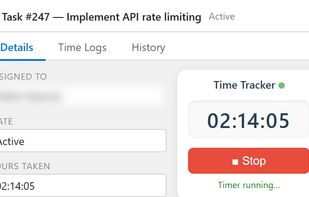

Cost / License
- Freemium (Subscription)
- Proprietary
Application type
Platforms
- Microsoft Azure
- Azure DevOps


Features

Azure DevOps Time Tracker News & Activities
Highlights All activities
Recent activities
- Paul updated Azure DevOps Time Tracker
- Paul updated Azure DevOps Time Tracker
- Paul updated Azure DevOps Time Tracker
- QServices Inc added Azure DevOps Time Tracker
 QServices Inc added Azure DevOps Time Tracker as alternative to Futuramo Time Tracker, Summit Finance and Clockify


Azure DevOps Time Tracker information
Developed by
 QServices Inc
 Licensing
Proprietary and Freemium product.Pricing
Subscription that costs $1 per month + free version with limited functionality.Alternatives
3 alternatives listedBadge
Get an embeddable badge for Azure DevOps Time TrackerSupported Languages


No comments or reviews, maybe you want to be first?