
AutoMosaic icon
AutoMosaic icon

AutoMosaic

AutoMosaic is an AI-powered Windows desktop application for automatically detecting target areas in images and applying mosaic, blur, black fill or white fill to multiple files in a batch.
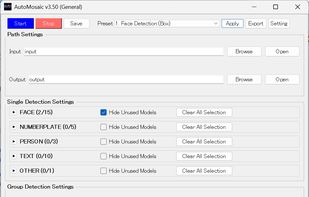
software UI

Cost / License

  • Pay once
  • Proprietary

Platforms

  • Windows  NVIDIA GPU acceleration is optional; CPU processing is also supported.

Features

Properties

  1.  Privacy focused
  2.  AI-Powered

Features

  1.  No registration required
  2.  Works Offline
  3.  Ad-free
  4.  Batch Editing
  5.  No Coding Required
  6.  Hardware Accelerated
  7.  Dark Mode
  8.  No Tracking
  9.  Batch processing
  10.  Image Processing

AutoMosaic News & Activities

Highlights All activities

Recent activities

AutoMosaic information

AutoMosaic was added to AlternativeTo by Nekzuk on and this page was last updated .
No comments or reviews, maybe you want to be first?

Official Links

What is AutoMosaic?

AutoMosaic is an AI-powered Windows desktop application for automatically detecting target areas in images and applying mosaic, blur, black fill or white fill to multiple files in a batch.

It is available in two commercial editions that share the same offline batch-processing workflow. The General edition detects people, faces, eyes, text, speech bubbles, sound effects and license plates for privacy, anonymization and editing workflows. The R18 edition uses different detection models and presets for sensitive body areas in adult-content production workflows.

Both editions perform detection and image processing locally without uploading images to a cloud service. AutoMosaic supports JPG, PNG, BMP, GIF and WebP, includes configurable presets, and can run using either CPU or NVIDIA GPU acceleration. The interface is available in English, Japanese, Simplified Chinese, Traditional Chinese and Korean.

AutoMosaic Videos
