AutoFlow RPA icon
AutoFlow RPA icon

AutoFlow RPA

A visual flowchart-based RPA desktop automation tool for Windows to automate mouse, keyboard, image recognition, and workflows.
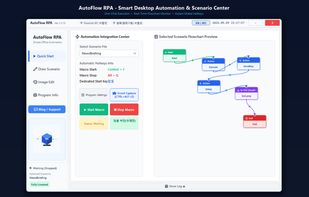
AutoFlow RPA screenshot 1

Cost / License

  • Freemium (Pay once)
  • Proprietary

Platforms

  • Windows  Supports Windows 10 and Windows 11 (64-bit). Also available directly via Microsoft Store.
0likes
0articles

Features

Properties

  1.  Privacy focused
  2.  Lightweight

Features

  1.  No Coding Required
  2.  Support for scripting
  3.  Ad-free
  4.  Recurring Tasks
  5.  Works Offline
  6.  No registration required
  7.  No Tracking
  8.  Portable
  9.  Subtasks
  10.  Image recognition
  11.  Workflow Automation
  12.  Flow Chart

 Tags

AutoFlow RPA News & Activities

Highlights All activities

Recent activities

AutoFlow RPA information

  • Developed by

    KR flagFlowSuiteYJC
  • Licensing

    Proprietary and Freemium product.
  • Pricing

    One time purchase (perpetual license) that costs $15 + free version with limited functionality.
  • Alternatives

    51 alternatives listed
  • Badge

    Get an embeddable badge for AutoFlow RPA
  • Supported Languages

    • English
    • Korean

AlternativeTo Category

Office & Productivity

Popular alternatives

View all
AutoFlow RPA was added to AlternativeTo by yjc-web on and this page was last updated .
No comments or reviews, maybe you want to be first?

Official Links

What is AutoFlow RPA?

AutoFlow RPA is a powerful, lightweight visual automation tool designed for Windows. It allows users to build and run complex automated tasks using an intuitive flowchart editor without requiring heavy coding knowledge.

Key Features: • Visual Flowchart Designer: Create automation sequences with intuitive Drag & Drop nodes (Actions, Decisions, Loops, I/O). • Precision Automation: Automate mouse clicks, mouse movements, relative coordinates, drag & drop, and keyboard keystrokes. • Smart Image Recognition: Real-time template matching and image condition checking with OpenCV-based preprocessing filters (Binarize, Grayscale, Invert, Edge). • Seamless Scrolling Screen Capture: Multi-page scrolling screenshot capture with automatic stitch-matching algorithms. • Remote Control & Notifications: Mobile remote triggering via FlowLink IPC and Telegram webhook notifications. • Single-Step Testing: Quick test-run for individual nodes directly from the flowchart context menu. • Dual-Language Support: Seamless Korean and English user interface.

AutoFlow RPA Videos

