


Auto Unload Tab
If you one of those persons who like to have much open tabs in Firefox browser, then you know how many PC resources that consumes. The solution is simple - unload unused tabs after some period of inactivity (user sets the time).

Cost / License
- Free
- Proprietary
Alerts
- Discontinued
Platforms
- Mac
- Windows
- Linux
- Online
- Firefox

The extension is no longer developed since 2016 and it is not compatible with Firefox Quantum.

Features
- Browser extension
- Browser integration
Tags
- browser-enhancement
- addon-for-firefox
- Firefox Extension
Auto Unload Tab News & Activities
Recent activities
Auto Unload Tab information
Developed by
def00111Licensing
Proprietary and Free product.Alternatives
11 alternatives listedSupported Languages
- English


What is Auto Unload Tab?
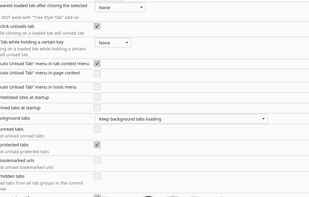
If you one of those persons who like to have much open tabs in Firefox browser, then you know how many PC resources that consumes. The solution is simple - unload unused tabs after some period of inactivity (user sets the time). Also you can minimize tabs widht and make them "deploy" when cursor is on top of them, keep one or more tabs loaded permanently, create whitelist/blacklist for tabs to load/unload and much more...Here is the list for all possible actions:
- Unload tab after minutes
- Close unloaded tab after minutes
- Bypass cache on restore
- Max loaded tabs
- Select nearest loaded tab after closing the selected tab
- Show "Auto Unload Tab" menu in tab context menu
- Show "Auto Unload Tab" menu in page context menu
- Load whitelisted sites at startup
- Load pinned tabs at startup
- Ignore unread tabs
- Load background tabs
- Middle-click unloads tab
- Dim pending tabs
- Reduce pending tabs width
- Highlight unread tabs
- Ignore bookmarked urls
- Check interval in minutes (for memory)
- Unload tab if size is over... (in megabytes)
- Ignore protected tabs
- Unload Tab while holding a certain key (alt|ctrl|meta|shift)
- Show "Auto Unload Tab" menu in tools menu
- Unload hidden tabs
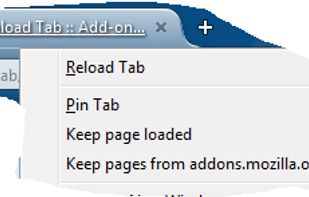
Tab context menu items:
- Unload Tab
- Keep Tab loaded
- Unload Other Tabs
Page context menu items:
- Keep [hostname] loaded
- Keep page loaded