




AudioRoo
1 like
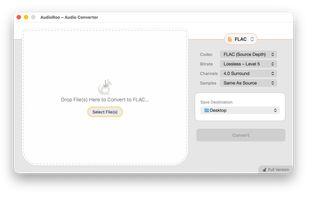
AudioRoo is a native macOS audio converter. Files or entire folders are dropped into a queue, which shows the channels, sample rate, and estimated output size for each item before anything runs. Batches detect the machine's performance cores and assign an FFmpeg instance to...

Cost / License
- Freemium (Pay once)
- Proprietary
Application type
Platforms
- Mac


Features
AudioRoo News & Activities
Highlights All activities
Recent activities
- oddforms liked AudioRoo
- oddforms added AudioRoo
- oddforms updated AudioRoo
 oddforms added AudioRoo as alternative to To M4A Converter for Mac and To MP3 Converter
- oddforms updated AudioRoo
- oddforms updated AudioRoo
- oddforms updated AudioRoo
- oddforms updated AudioRoo
- oddforms updated AudioRoo
- oddforms updated AudioRoo

AudioRoo information
Developed by
 Oddforms Design LLC
 Licensing
Proprietary and Freemium product.Pricing
One time purchase (perpetual license) that costs up to $9 + free version with limited functionality.Alternatives
11 alternatives listedBadge
Get an embeddable badge for AudioRooSupported Languages


No comments or reviews, maybe you want to be first?