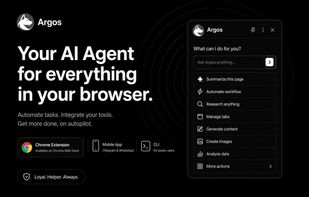
Argos AI is an agent that works in three places and shares one memory between them: the page you have open, a cloud browser that keeps running when your laptop is closed, and your own computer.
In the browser it operates the page directly through the Chrome DevTools Protocol, sending real mouse and keyboard input. A dedicated layer resolves elements from plain descriptions, fills custom dropdowns and React-controlled inputs, works through tables, and detects navigation between steps. It completes long forms, moves through multi-step checkouts, compares products across tabs, and extracts data from dashboards that offer no export.
Connect a messaging account and the same agent gains a server-side browser with its own shell and your own site sessions. Long jobs finish after you shut the laptop, and the result arrives in your chat. Independent subtasks run in parallel and merge into a single answer.
Install the CLI and that same agent operates your actual machine: a real shell for files, scripts and installed tools, alongside your genuine logged-in Chrome, commanded from the browser panel or from your phone. It runs on your own model key, so you pay your provider directly, and destructive commands stop for explicit confirmation.
Other capabilities:
- Scheduled actions, described in plain language and delivered on a cron schedule.
- Proactive alerts, such as price watches and morning briefings.
- Deep research that plans the work, reads through sources, and returns a structured report with links.
- Real file generation: spreadsheets, documents, PDFs, CSVs, charts and HTML, created in the chat and ready to download.
- Page reshaping, so a page shows only what you need and stays that way while you scroll.
- A focus mode judged against the goal you set, rather than a fixed blocklist.
- Persistent memory of your name, projects and preferences, shared across every surface.
Free to start, no card required. Argos never reads or fills passwords and never collects payment details.









No comments or reviews, maybe you want to be first?