ArcThumb is a lightweight Windows shell extension that extracts the first image — or the actual cover — from archive and ebook files and displays it as the file's thumbnail in Windows Explorer.
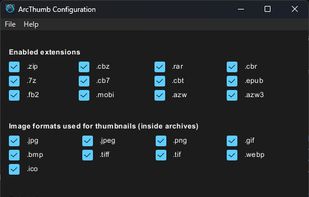
Supported archive formats include ZIP, RAR, 7Z, and their comic book variants CBZ, CBR, CB7, and CBT. For ebooks, ArcThumb handles EPUB, FB2, MOBI, AZW, and AZW3, parsing each format's metadata (OPF manifest for EPUB, coverpage reference for FB2, EXTH 201 CoverOffset for Kindle formats) to pick the correct cover rather than an arbitrary embedded image.
ArcThumb also implements IPreviewHandler, so the same cover image appears in Explorer's preview pane (Alt+P) at full resolution. An optional identification overlay can mark each thumbnail with a format-coloured border and a small corner label such as CBZ or EPUB, making archives easier to distinguish from plain image files at a glance. A small configuration GUI lets you toggle supported extensions, choose sort order, set cover-name preferences, and switch the UI language between English and Japanese.
The extension installs per-user under %LOCALAPPDATA% with no admin rights required and no system-wide registry changes. It can be installed via the Windows Package Manager with the command "winget install CitrusSoda.ArcThumb", or by downloading the installer from GitHub Releases. Image formats supported inside archives are JPEG, PNG, GIF, BMP, TIFF, ICO, and WebP.
ArcThumb is inspired by CBX Shell and DarkThumbs, rewritten from scratch in Rust with modern Windows 10/11 support.







 citrussoda-com
No comments or reviews, maybe you want to be first?