


Archive Extractor
To use this tool, you need to have WinRar installed at the path "C:\Program Files\WinRAR" (which is typically set by default). Alternatively, you can have 7z installed at the path "C:\Program Files\7-Zip" (this is usually set by default as well).
Cost / License
- Free
- Proprietary
Platforms
- Windows

Archive Extractor
Features
Archive Extractor News & Activities
Recent activities
Archive Extractor information
What is Archive Extractor?
To use this tool, you need to have WinRar installed at the path "C:\Program Files\WinRAR" (which is typically set by default). Alternatively, you can have 7z installed at the path "C:\Program Files\7-Zip" (this is usually set by default as well). Please note that if you only have 7z installed, you will not be able to extract .rar files, but only .zip or .7z files.
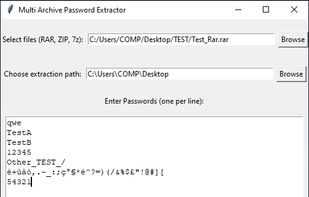
This tool is primarily designed to extract files from password-protected Rar/Zip/7z archives, although it also works on unprotected archives. You can extract one or more archives of different types at a time. It is important to note that the passwords must be known; this is NOT a "cracking software" or "password recovery tool."
https://github.com/xSilverRabbit90x/Archive-Extractor-Tool.git