
ArabicKeys icon
ArabicKeys icon

ArabicKeys

 1 like

Free phonetic Arabic keyboard layout for Windows, Mac and Linux: each Arabic letter sits on the Latin key that sounds like it.
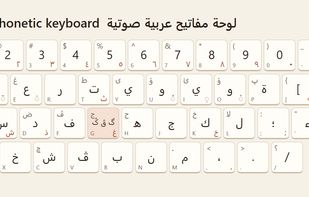
How it looks when installed

Cost / License

  • Free
  • Proprietary

Since

  • New

Platforms

  • Windows  Windows 10 and 11 on Intel and AMD PCs (not ARM).
  • Mac
  • Linux
1like
0articles
Save

Features

Highlights All activities

ArabicKeys News & Activities

Recent activities

ArabicKeys information

ArabicKeys was added to AlternativeTo by Sami-Mahmoudi on and this page was last updated .

No comments or reviews, maybe you want to be first?

What is ArabicKeys?

ArabicKeys Phonetic is a free keyboard layout you install on Windows, macOS or Linux to type Arabic in every app, on the keyboard you already have. Each Arabic letter sits on the Latin key that sounds like it, so there is no new layout to learn: s types س, b types ب, t types ت.

Shift gives the deep letter (Shift+S types ص, Shift+H types ح), and AltGr (Option on a Mac) gives the letter written with an added h in Latin (AltGr+S types ش, AltGr+T types ث, AltGr+K types خ). AltGr on a vowel adds its short vowel mark, and AltGr on a number types the Eastern Arabic digits ١٢٣.

It comes in three versions for the G letter of your region: گ for Iraq and the Levant, ڨ for Algeria and Tunisia, and ݣ for Morocco. Every Arabic letter has a key.

The Windows version installs with a double-click and removes with the included uninstaller. The Mac version is a keyboard layout bundle, and the Linux version is an XKB layout with install scripts. Layout sources are included. No account, no ads, no data collection.

The same site also has a free online Arabic keyboard for when you are not on your own computer.