
Apotrope icon
Apotrope icon

Apotrope

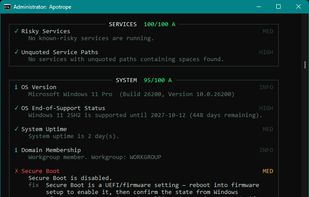
Offline, single-executable Windows security posture auditor. 50+ CIS-mapped checks, a 0–100 score, and a self-contained HTML report. No cloud, no agent. MIT.
Apotrope screenshot 1

Cost / License

  • Free
  • Open Source (MIT)

Platforms

  • Windows  Windows 10, Windows 11

Features

Properties

  1.  Privacy focused
  2.  Lightweight

Features

  1.  Portable
  2.  Command line interface
  3.  No Tracking
  4.  No installation required
  5.  Security Audit Report
  6. JSON icon  Export to JSON
  7.  Offline
  8.  No Telemetry
  9.  Export to HTML

Apotrope News & Activities

Highlights All activities

Recent activities

  • Lynis icon
    hexorcist404 added Apotrope as alternative to Lynis
  • niksavc liked Apotrope
  • hexorcist404 thinks Offline is a important feature of Apotrope
  • OpenSCAP icon
    hexorcist404 added Apotrope as alternative to OpenSCAP
  • hexorcist404 liked Apotrope
  • hexorcist404 added Apotrope

Apotrope information

AlternativeTo Category

OS & Utilities

GitHub repository

  •  12 Stars
  •  0 Forks
  •  2 Open Issues
  •   Updated  
View on GitHub

Popular alternatives

View all
Apotrope was added to AlternativeTo by Ryan on and this page was last updated .
No comments or reviews, maybe you want to be first?

Official Links

What is Apotrope?

Apotrope audits how locked-down a Windows machine actually is. It runs around 55 checks across 14 categories — firewall, BitLocker, RDP, SMB, PowerShell, accounts, services, persistence, patching, the usual suspects — and maps every finding to a CIS Benchmark control. It works out which benchmark applies (Windows 11 v5.0.0, Windows 10 v4.0.0) on its own, so you're not picking versions by hand. At the end you get a 0–100 score with a letter grade, plus reports in three shapes: a self-contained HTML file for whoever is doing the remediation, an executive-style Security Posture Assessment for the decision-makers who care about business impact, and JSON for when you're wiring this into automation. Every finding ships with copy-paste PowerShell remediation, so it's not just naming what's broken and walking off. The whole thing is built around one idea: it stays on the box. No network calls, no telemetry, no cloud account, no agent to install. It's read-only, so it won't touch your registry or flip a single setting. Point it at a machine, get the picture, leave nothing behind. It's a single .exe with no dependencies, or pip install apotrope on Python 3.12+ if you'd rather. Run it without admin for a limited pass, or elevated for the full set. Save a baseline and diff against it later to watch remediation actually land. Tune the checks per environment with an apotrope.toml profile. MIT licensed. Source is on GitHub.
