Aloudly icon
Aloudly icon

Aloudly

 Like

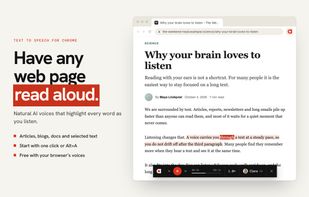
Text to speech for Chrome: reads any web page, PDF or selected text aloud with natural AI voices and highlights every word as it is spoken.
Aloudly screenshot 1

Cost / License

  • Freemium (Subscription)
  • Proprietary

Platforms

  • Google Chrome
0likes
0articles
Save

Features

Properties

Features

Highlights All activities

Aloudly News & Activities

Recent activities

Aloudly information

  • Developed by

    DE flagHannes Heissmeyer
  • Licensing

    Proprietary and Freemium product.
  • Pricing

    Subscription ranging between $5 and $15 per month + free version with limited functionality.
  • Alternatives

    51 alternatives listed
  • Badge

    Get an embeddable badge for Aloudly
  • Supported Languages

    • English
    • German
    • Spanish
    • Italian
    • French
    • Arabic
    • Japanese
    • Chinese
    • Russian
    • Polish
    • Bulgarian
    • Czech
    • Slovak
    • Hungarian
Aloudly was added to AlternativeTo by Hannesnvr on and this page was last updated .

No comments or reviews, maybe you want to be first?

Official Links

What is Aloudly?

Aloudly is a text to speech extension for Chrome. It reads web pages, PDFs and selected text aloud with natural AI voices and highlights every word as it is spoken, so you can listen and read along at the same time.

Start with one click on the toolbar icon or with Alt+A (Option+A on a Mac). Aloudly finds the article and skips menus, ads, footers, citation markers like [1] and long links. The current sentence is shaded, the spoken word lights up and the page scrolls with the voice. Click any sentence to jump there.

Voices

  • Free, unlimited browser voices
  • 30 natural AI voices that speak more than 100 languages, including six ready-made characters for different kinds of text
  • Describe the tone in one sentence ("read slowly and calmly") and save it as your own character
  • Speed from 0.5x to 4x on every plan, including the free one
  • Detects the language of each paragraph, so mixed-language pages are read with the right pronunciation

PDFs

  • Open a PDF in Chrome and start reading. Columns are read in the right order, headers, footers and page numbers are left out, and Aloudly remembers where you stopped. PDFs stay on your device.

Pricing

  • Free forever: unlimited reading with browser voices and every reading feature, plus a 15-minute AI voice trial. No credit card, no account.
  • Pro: 4 hours of AI voice per month for €7.99/month or €69.99/year
  • Power: 10 hours per month for €14.99/month or €159.99/year
  • AI time is counted at normal speed, so listening at 2x does not use it up twice as fast. Replaying is free.
  • No account: you get a license key by email, for up to 3 devices. Cancel anytime, money back within 14 days.

Privacy

  • Aloudly only accesses a page when you start reading it and never needs access to all websites.
  • AI voices are used only after you agree, and then only the passage being read is sent to create speech, never the page address.
  • No ads, no tracking, no selling of data.

Good for long articles, studying, language learning, proofreading by ear, and for people with dyslexia, ADHD or low vision.

