


All-in-One Sidebar
14 likes
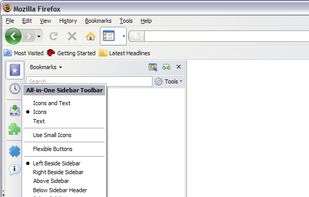
All-in-One Sidebar (AiOS) is a sidebar control, inspired by Opera . Click on the left edge of your browser window to open the sidebar and get easy access to all your panels.

Cost / License
- Free
- Proprietary
 EU
EUAlerts
- Discontinued
Platforms
- Mac
- Windows
- Linux
- Waterfox
- Pale Moon
- Firefox


Features
All-in-One Sidebar News & Activities
Highlights All activities
Recent activities
No activities found.
All-in-One Sidebar information
Developed by
 Ingo Wennemaring
 Licensing
Proprietary and Free product.Alternatives
3 alternatives listedBadge
Get an embeddable badge for All-in-One SidebarSupported Languages
AlternativeTo Category
Web Browsers

Featured in Lists


Discontinued Legacy Addons for Firefox
Firefox Quantum has been released a few days ago. The new update from Mozilla is one met with excitement from many users, for good reason. Firefox Quantum is extremely fast, gives you a smooth browsing experience, comes with a polished interface, and finally drops Yahoo! Search as the default search engine (Sorry Yahoo, it was time for you to go). There were, however, many users who were frustrated with the new update, as many of the add-ons that made Firefox so useful are no longer supported in the Quantum update.
Firefox Quantum uses the new WebExtensions API, while many add-ons use the older API that is no longer supported in the updated version. This comes as a disappointment, especially for power-users who enjoyed Firefox for the powerful add-ons that were created for it, such as Firebug or FlashGot . So if you're one of the users that is unhappy about the lack of backwards compatibility, what can you do?
First, you can search for an alternative extension. Luckily, Firefox makes this pretty easy. If you go into "Add-Ons" from the Firefox menu, you'll see your current add-ons. If you aren't seeing add-ons that you previously had installed, before the update, then it is likely they aren't supported in the new version. If this is the case, you can find them by clicking "Legacy Extensions" on the left-hand side of the page. You should see something similar to the screenshot below (depending on the add-ons installed, of course):
As you can see, if you have an unsupported legacy add-on installed, Firefox now gives you the ability to "Find a Replacement." Which you can do by clicking the respective button, on the right-hand side of the add-on. From there, you'll be taken to a page where you can browse alternative add-ons for the unsupported legacy add-on. In most cases, for most add-ons, this works well and you are likely to be able to find a suitable replacement for the add-on you were attached to.
Second option, you can wait and hope that the developers port the legacy add-on to the new WebExtensions API. Unfortunately, some add-on developers have already announced that they won't be porting to support WebExtensions API, such as Firebug and Selenium IDE . Others have announced that updates are in the works, such as LastPass and Greasemonkey , so be sure to check out the website for your favorite add-on to see what the status on an update is.
Finally, if the above two options don't work for you, you can always find and switch to an alternative web browser. You can check out the possible alternatives to Mozilla Firefox . But before you think about making the switch to another browser, you should know that Firefox Quantum is an incredible leap forward for Firefox. The improvements are tremendous, and Mozilla's commitment to ensuring future stability with the browser is clear - you may want to stick around with Firefox.
Here is a list of some of the top add-ons that will not be updated and therefore will not work in Firefox Quantum:

No comments or reviews, maybe you want to be first?