Never miss a deadline, meeting, appointment, or daily routine again. Alarmz is a full-featured Windows alarm manager built for professionals, students, and anyone who needs dependable, flexible reminders with powerful delivery options. From a simple five-minute break timer to a complex monthly billing cycle, Alarmz handles every scheduling scenario and delivers alerts exactly how and where you need them — spoken aloud, on your desktop, by SMS, by push notification, by email, or by launching a program automatically.
FOR PROFESSIONALS
Alarmz fits naturally into any professional workflow. Set a recurring alarm to follow up with a client every Tuesday and Thursday, fire a monthly reminder on the last weekday of each month for your expense report, trigger a PowerShell script that generates a dated report and opens it automatically, or send an SMS to your mobile phone and an email to your team at the same moment. The Run Program feature with date-aware argument tokens automates any date-stamped workflow: open a daily briefing URL, run a nightly backup script, or launch today's dated export without lifting a finger. Each alarm can send to a different phone number or email address, so routing notifications to the right person for the right alarm is built in.
FOR PERSONAL USE
Whether you need medication reminders, hydration nudges, workout countdowns, or bill payment alerts, Alarmz keeps you on track with minimal effort. The 12 one-click preset timer buttons — triggered by Shift+F1 through Shift+F12 — put your most-used timers one keystroke away without switching windows or opening any dialogs. Assign labels like "Coffee" (15 minutes from now), "Lunch" (1 hour from now), or "Standup" (next Monday at 9 AM) and create any of them instantly. Configure spoken messages with your name, the current time, or a custom audio file so the alarm feels personal rather than generic.
RECURRING ALARMS WITH OUTLOOK-STYLE SCHEDULING
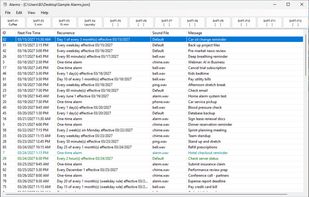
Alarmz supports six recurrence frequencies — every N minutes, every N hours, daily, weekly, monthly, and yearly — with the same depth of configuration as Microsoft Outlook's Appointment Recurrence dialog.
Every recurring alarm supports three end conditions: no end date for perpetually repeating reminders, end after a fixed number of firings for limited-run tasks that clean up after themselves, or end by a specific date. When an alarm exhausts its occurrence limit it removes itself from the list automatically.






 bjones9942 added Alarmz as alternative to Fossify Clock, Chrono Clock, Clock (by BlackyHawky), ClockYou and 50 more
 BrettonJones


No comments or reviews, maybe you want to be first?