Set alarms for any date. Months out, weeks ahead, or tomorrow morning.
Regular alarm apps don't see past weekly confines. Plan your entire year with Alarm Planner.
For shift workers, travellers, parents, and anyone whose week doesn't repeat in a 7-day loop.
WHAT IT DOES
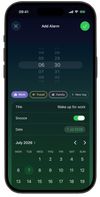
• Pick any date on the calendar. Set an alarm for next week, six months from now, or two years out
• Group your alarms by Work, Travel, Family, Health or create your own
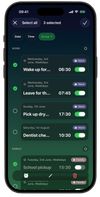
• Bulk edit multiple alarms at once or just toggle them on or off when life shifts
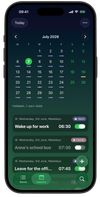
• See every alarm laid out across the month or the year on the calendar tab
• Custom snooze duration: 1 to 30 minutes, not the locked 9 minutes elsewhere
• Customise your alarm sound. Use one of 19 built-in sounds or add your own
• Rings through Silent and Focus. No need to keep the phone unlocked and rings even if the app has been closed for weeks
• Need a powernap? Long-press the + button for quick nap alarms: 10, 15, 20, or 30 minutes
• Recurring patterns: daily, weekdays, weekends and custom
• Native iOS 26 design built with Liquid Glass
• Skip any future alarm without turning off the repeat
• 23 colour themes, light and dark, plus extra home screen app icons
• Adjustable text size, right in the app
THE THINGS PEOPLE SET ALARMS FOR
The 6:30 wake-up. The park meter at 11. The school run. Taking your meds. Catching the 8:12 train. Mum's birthday. Renewing the parking permit. The early alarm before a morning workout. The reminder you set three months ago for something you'd otherwise forget about.
Some are tomorrow. Some are months from now. Alarm Planner handles both kinds.
BUILT NATIVE
Built on Apple's iOS 26 AlarmKit framework. Rings through Silent. Rings through Focus. Rings through Do-Not-Disturb. Reliable like a native alarm. With the features other alarm apps don't ship.
MADE BY ONE PERSON
I built Alarm Planner for two reasons. Regular alarm apps don't let me set alarms for things further out than this week. And managing more than a handful of alarms at once is more clicks than it needs to be.
So I built an app that does both.
FREE TO USE
Free for up to 3 alarms and 3 themes, with every core alarm feature included. Need more? Unlock unlimited alarms, all 23 themes, extra app icons, and alarm skipping with a yearly plan or a one-time Lifetime purchase.
PRIVACY
No account required. Your alarms stay on your device. Anonymous usage data helps me improve the app. No personal info, no alarm content. Opt out in Settings.
Terms of Use: https://alarmclockplanner.com/terms/







 EU
EU
 Emils Ozols added Alarm Clock Planner as alternative to Alarmate, AlarmiFex and AutoAlarm
 Emils Ozols


No comments or reviews, maybe you want to be first?