



Jitsi Meet introduces multi-screen capabilities for conference room setups
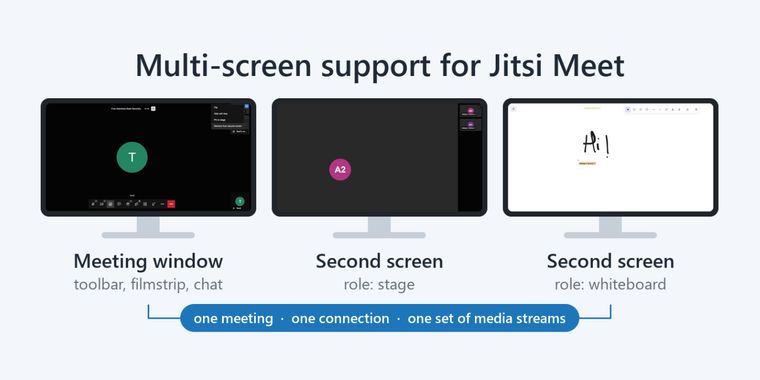
The open-source video conferencing platform Jitsi Meet has introduced a new multiscreen feature that transforms how single meetings display across multiple monitors. Previously, users with dual-monitor setups or conference rooms with multiple displays would see identical content on each screen, or nothing at all on secondary displays. The new functionality, developed as a Google Summer of Code 2026 project, enables a single Jitsi Meet session to render distinct layouts simultaneously: the active speaker view on one screen, a presentation screenshare on another, and collaborative tools like the whiteboard on a third, all without requiring participants to join the meeting multiple times.
Unlike workarounds that involved opening the same meeting room in separate tabs, a practice that created duplicate participants, doubled bandwidth consumption, and required manual audio muting, multiscreen support maintains a single participant identity while distributing content intelligently across available displays. The feature is accessible through both an API for embedded implementations and direct UI controls within the application itself. Users can right-click on participant videos, access whiteboard tile menus, or hover over shared video thumbnails to trigger “Show on second screen” options. For IT administrators managing conference rooms, the functionality can be enabled through configuration files or tested immediately on the beta.meet.jit.si deployment by appending a specific URL parameter.
The feature rolls out with an opt-in model, remaining disabled by default until deployments configure it through the secondScreen.enabled setting. Jitsi has noted that the window IDs are managed by the embedder, allowing room controllers to address specific displays by name and retarget content dynamically during ongoing sessions. While the current release focuses on core functionality for standard meeting environments, the underlying infrastructure signals potential for expanded enterprise-grade conference room deployments where wall-mounted displays or workstation multi-monitor arrangements are common fixtures.




- Video Calling App
- Free
- Open Source
Related news
External links
- Introducing Multi-screen support for Jitsi MeetJitsi • Official source
No comments so far, maybe you want to be first?