• YUMI exFAT icon
  • UNetbootin icon
  • Rufus icon
  • MultiBootUSB icon

USB Boot

Shoji VRShoji VR4 appsUpdated
Copy a direct link to this comment to your clipboard
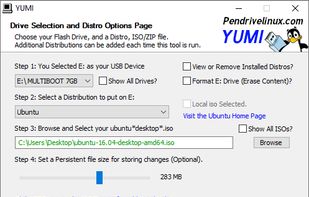
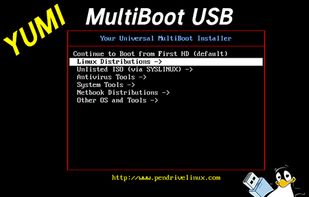
  1. The YUMI exFAT (Your Universal Multiboot Installer) media creation tool can be used to automatically create an exFAT bootable USB flash drive containing multiple operating systems, antivirus utilities, disc cloning, diagnostic tools, and more.

    Cost / License

    • Free
    • Open Source

    Application type

    Platforms

    • Windows
    • PortableApps.com
    • Wine
    • WineBottler
    YUMI exFAT screenshot 1
    YUMI exFAT screenshot 1
    Shoji VRShoji VR’s note
    • GPT/UEFI Support with FAT32 UEFI, Multi Distro supported, uninstaller supported
    • YUMI doesn’t support multiple windows ISO because it will replace old windows ISO with new windows ISO so when you boot it, it detects the newer one instead of old one
  2. Cross-platform utility to create bootable USB drives or Live USBs, with a built-in downloader for Linux ISO images and rescue disks.

    Cost / License

    • Free
    • Open Source

    Application type

    Platforms

    • Mac
    • Windows
    • Linux
    • PortableApps.com
    Welcome screen
    Distributions list
    Using ISO file
    Shoji VRShoji VR’s note
    • Have issues on autorun.inf when install more than one distributions,
    • Uninstaller Not Supported
  3. Rufus icon
     Like

    Formats USB drives to various file systems and creates bootable USBs from ISOs. Supports MS-DOS/FreeDOS bootable sticks and offers BIOS or UEFI options.

    Cost / License

    • Free
    • Open Source

    Application type

    Platforms

    • Windows
    • PortableApps.com
    Rufus screenshot 1
    Rufus screenshot 2
    Rufus screenshot 3
    Shoji VRShoji VR’s note
    • GPT/UEFI Support with NTFS UEFI,
    • Only can install 1 distro / USB
  4. MultiBootUSB is a software to create multi boot live Linux on a removable media i.e USB disk. It is similar to UNetbootin icon UNetbootin but many distros can be installed, provided you have enough space on the disk.

    Cost / License

    • Free
    • Open Source

    Application type

    Platforms

    • Windows
    • Linux
    MultiBootUSB screenshot 1
    MultiBootUSB screenshot 1
    MultiBootUSB screenshot 2
    +1
    MultiBootUSB screenshot 3
    Shoji VRShoji VR’s note

    Stuck on Windows Logo

Comments

appexpertimenter
0

Heya I recommend you add Ventoy.