• Stop Resetting My Apps icon
  • R
  • Gluxon eXpresso icon
  • Default Programs Editor icon
  • Coffee icon

File Association

Shoji VRShoji VR5 appsUpdated
Copy a direct link to this comment to your clipboard
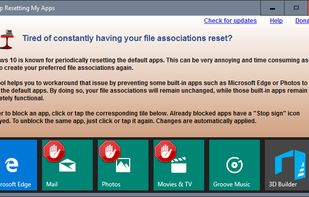
  1. As you may have already experienced, Windows 10 may periodically reset the default apps. The reset action usually takes place after a Windows update or an update of one of the Windows built-in apps such as Microsoft Edge, Photos or Groove Music.

    Cost / License

    • Free
    • Proprietary

    Platforms

    • Windows
    Stop Resetting My Apps screenshot 1
    Shoji VRShoji VR’s note

    This application was updated to work with Windows 10 build 15063

  2. Here is a tool which can register Mozilla Firefox Portable Edition with the Default Programs tool in Windows 7/Vista.

    Cost / License

    • Free
    • Proprietary

    Platforms

    • Windows
    1. Download registerfp.zip and save to Desktop.

2. Unzip the archive and extract the contents to a folder.

3. Double-click the file RegisterFirefoxPortable.exe to run it

4. When you see the User Account Control dialog, click Allow
    5. Click the Browse button and locate the Firefox Portable executable
    6. Click Register
    Shoji VRShoji VR’s note
    • Easily associate portable firefox as default programs
    • it can be used for another portable browser such as google chrome portable, etc.
  3. It allows to create portable file associations with your portable software and use them to open files, instead of the default system associated apps. No modifications are made to the host system and files are opened with portable file associations only if the tool is active.

    Cost / License

    • Free
    • Open Source

    Platforms

    • Windows
    Shoji VRShoji VR’s note
    • Official Website and Download are not available
    • Last development in 2013 whch i can assume it is Discontinued
  4. Default Programs Editor is a powerful but simple file association utility for Windows 7, Vista and XP. This free utility has three main functions: context menu editor, auto-play editor, and default programs association editor.

    Cost / License

    • Free
    • Proprietary

    Application type

    Platforms

    • Windows
    • .NET Framework
    Default Programs Editor screenshot 1
    Default Programs Editor screenshot 1
    Default Programs Editor screenshot 2
    +2
    50% of tested extensions: Shell extensions cannot be edited
    Shoji VRShoji VR’s note

    This application has been discontinued last update 2010

  5. Coffee icon
     Like

    It handles the double-click on files and redirect them to your portable application instead of the associated application registered in the registry. You can also define an alternate application that will be launched by holding down the ALT key during the double-click.

    Cost / License

    • Free
    • Open Source

    Platforms

    • Windows
    Coffee screenshot 1
    Shoji VRShoji VR’s note

    Not been announced discontinued but was last updated in 2008. Seems it’s replaced by eXpresso. See changelog: http://www.lupopensuite.com/db/oth/changelog.htm

No comments so far, maybe you want to be first?