• Playnite icon
  • GOG GALAXY icon
  • Steam icon
  • Pegasus icon
  • Lutris icon
  • +1

Game Library Managers

student twenty6 appsUpdated
Copy a direct link to this comment to your clipboard

So, some of the Alternative listings for stuff like GNOME Games and Lutris are filled with Emulators, which, last I checked, weren't game library managers or game launchers. So I decided to collect a list of all the ones I've personally used!

  1. Playnite icon
     Like

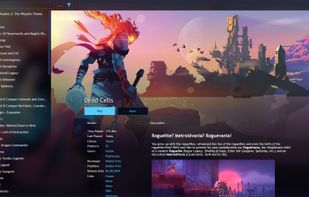
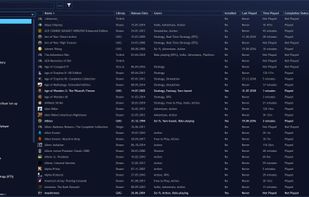
    Open-source game library manager unifying PC and emulated titles from platforms including Steam, GOG, and Origin with customizable plugins and themes.

    Cost / License

    • Free
    • Open Source

    Application type

    Platforms

    • Windows
    Playnite screenshot 1
    Playnite screenshot 1
    Playnite screenshot 2
    +1
    Playnite screenshot 3
    student twenty’s note

    A good enough Game Launcher, Playnite works with emulators, Steam, GOG, Itch.io and Humble Bundle (along with others I won't touch). It catalogues all your games, and makes customizations (launch options, art, etc.) simple. It has a skinnable UI, and the skins are written in CSS, so that's great, too. Sadly, it's Windows only.

  2. Connect GOG GALAXY 2.0 with multiple platforms and unite all your games and friends scattered across them in one powerful app.

    Cost / License

    • Free
    • Proprietary

    Application type

    Platforms

    • Mac
    • Windows
    GOG GALAXY screenshot 1
    GOG GALAXY screenshot 1
    GOG GALAXY screenshot 2
    student twenty’s note

    GOG Galaxy 2.0 came out recently and it's kinda awesome. You can add your Steam, Epic, and other libraries to it easily. It doesn't handle emulators (AFAIK), but if you use Retroarch, you probably don't need a launcher for your emulator anyway. Sadly, it's not available on Linux (yet), and the customization options are very limited - there's no theming (yet), for instance. Anyway, a great launcher from a great store.

  3. Steam icon
     Like

    Steam is a digital distribution, digital rights management, multiplayer and communications platform developed by Valve Corporation. It is used to distribute a wide range of games and related media entirely over the internet, stretching from one-man independent efforts to some of...

    Cost / License

    • Free
    • Proprietary

    Application type

    Platforms

    • Mac
    • Windows
    • Linux
    • Online
    • Android
    • iPhone
    • Android Tablet
    • Windows Phone
    • iPad
    • Snapcraft
    • Flathub
    • SteamOS
    Steam screenshot 1
    Steam screenshot 1
    Steam screenshot 2
    +4
    Steam Store
    student twenty’s note

    You can technically add all sorts of games - including emulated ones - to your Steam library. Unfortunately, it is and always has been a pain in the ass, and there's little sign of that changing. The custom skins can be cool, and it works on basically every platform (although getting it going on *BSD is difficult to say the least).

  4. Pegasus icon
     Like

    Pegasus is a graphical frontend for browsing your game library (especially retro games) and launching them from one place. It's focusing on customizability, cross platform support (including embedded devices) and high performance.

    Cost / License

    • Free
    • Open Source

    Application type

    Platforms

    • Mac
    • Windows
    • Linux
    • Android
    • Raspberry Pi
    Pegasus screenshot 1
    Pegasus screenshot 1
    Pegasus screenshot 2
    student twenty’s note

    Probably the best overall cross-platform launcher/library manager. It's open source, very customizable, and doesn't hide any features behind a paywall. That said, it's not the easiest one to work with, and it can be a bit fiddly to work with overall. Still, with the right configuration, it can look amazing and run like a dream.

  5. Lutris icon
     Like

    Lutris is an open source gaming platform for GNU/Linux. It allows you to gather and manage (install, configure and launch) all your games acquired from any source, in a single interface.

    Cost / License

    • Free
    • Open Source

    Application type

    Platforms

    • Linux
    • Online
    • Flathub
    Lutris screenshot 1
    Lutris' main window
    student twenty’s note

    Your best option on Linux (and probably FreeBSD with a compatability layer), Lutris is a powerful game library manager and launcher. It lets you set up very individualized launch setups, is skinable, and cheerfully manages your emulation. I dearly wish it was available on Windows and OSX, because then it would be the best cross-platform option.

  6. Games is a GNOME application to browse your video games library and to easily pick and play a game from it. It aims to do for games what Music already does for your music library.

    Cost / License

    • Free
    • Open Source

    Platforms

    • Linux
    • Flathub
    • GNOME
    • Flatpak
    GNOME Games screenshot 1
    student twenty’s note

    So, I love the GNOME desktop. Gnome 3 works the ay my brina works, I guess, and I love the look and workflow paradgm. Most of their additional apps are great, too. But GNOME Games is a bit lackluster. It looks good and integrates well into the GNOME Shell, but it requires hunting down config files for any advanced configuration - and there isn't much in the way of options even then. It works well within its narrow edge, but isn't good enough if you have games outside of your Games folder or need any advanced options.

No comments so far, maybe you want to be first?