• Image Search Options icon
  • Yandex.Images icon
  • Google Images icon
  • TinEye icon
  • Bing Images icon
  • +2

Image Search Engines

abyssalmangabyssalmang7 appsUpdated
Copy a direct link to this comment to your clipboard

I use image search engines a lot. I have used all of these hundred if not thousands of times, because I'm an image hoarder and I like everything to be organized. So I need to know the source of everything.

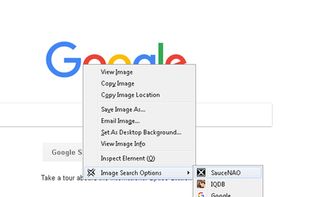
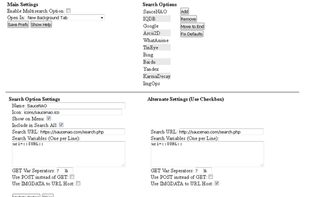
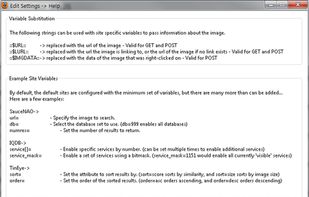
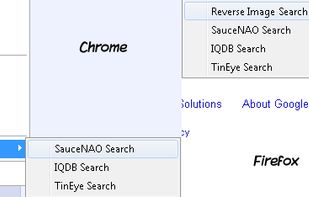
  1. Image Search Options provides a set of highly customizable reverse image search context menu options.

    Cost / License

    • Free
    • Open Source

    Application type

    Platforms

    • Online
    • Google Chrome
    • Mozilla Firefox
    Image Search Options screenshot 1
    Image Search Options screenshot 1
    Image Search Options screenshot 2
    +1
    Image Search Options screenshot 3
    abyssalmangabyssalmang’s note

    An add-on that will give you instant access to most of the websites talked about on this list through the context menu of your browser. Better than having five or six different add-ons for each individual search site.

Broad Search

  1. Search for images with Yandex's engine offering reverse image search, finding amusing pictures, wallpapers, and detailed image results.

    Cost / License

    • Free
    • Proprietary

    Application type

    Platforms

    • Online
    abyssalmangabyssalmang’s note

    This is the best broad image search engine I have used. It gives you the most results, it tells you what size/resolution you can get for an image and it has the most relevant comparisons and related images in my experience. It also is the most likely to guess correctly what the source of an image is, without you needing to sift through links. It also isn't going to look at a picture of Nico Yazawa and return a generic search result like "girl," like Google will 90% of the time.

    I wouldn't say it's leaps and bounds over Google in every category, but it has a pretty hard edge over it and I have had the most success with it over the years. The one flaw, for me at least as an American English speaker is that the engine returns most results in Russian. This isn't a huge problem but I can see it being a barrier for some people.

  2. The most comprehensive image search on the web.

    Google Images is a search service created by Google that allows users to search the Web for image content. The keywords for the image search are based on the filename of the image, the link text pointing to the image, and text ad.

    Cost / License

    • Free
    • Proprietary

    Application type

    Platforms

    • Online
    Google Images screenshot 1
    Google Images screenshot 1
    Google Images screenshot 2
    abyssalmangabyssalmang’s note

    I don't really like Google as a company, but this search engine does work and works better than some of the alternatives. Like the next entry. I almost always prefer Yandex but if other search engines do fail me, I will come back to this as a last resort.

  3. TinEye icon
     Like

    Efficient reverse image search engine that identifies exact usages and altered images online, provides source information, and ensures ad-free, lightweight experience.

    Cost / License

    • Free Personal
    • Proprietary

    Application type

    Platforms

    • Online
    • Microsoft Edge
    • Google Chrome
    • Opera
    • Mozilla Firefox
    TinEye screenshot 1
    TinEye screenshot 1
    TinEye screenshot 2
    abyssalmangabyssalmang’s note

    Tineye is the worst image search engine that most people will suggest you use. It never has better or more results than the previous two and in my experience most of the time it doesn't have results period. I tried using this when I first got the fever of needing to know the source of everything, but I quickly stopped when I realized it almost never helped me with any searches.

  4. Search images with Bing.

    Cost / License

    • Free
    • Proprietary

    Application type

    Platforms

    • Online
    Bing Images screenshot 1
    abyssalmangabyssalmang’s note

    Bing is worse than Google when it comes to overall results, but when it does find an image it has better, more relevant "like" images and a nicer, easier to use interface to browse them. I don't use it that often, but I do like the UI a lot.

Specific Search

  1. IQDB icon
     Like

    Multi-service image search

    Upload an image or thumbnail from a file or URL to find it (or similar images) among:

    Haruhi doujins (Haruhi doujins) Danbooru (anime artwork) Konachan (anime wallpapers) Moe.imouto.org (high-res scans) Gelbooru (anime artwork) Sankaku Channel (anime.

    Cost / License

    • Free
    • Proprietary

    Application type

    Platforms

    • Online
    IQDB screenshot 1
    IQDB screenshot 1
    abyssalmangabyssalmang’s note

    This is the best niche search engine for Boorus and sites like those and I would say after Yandex this is the one I use the most and get the most successful results with. It's not great with real life/cosplay images, but in terms of drawn and animated content this search engine is king.

  2. SauceNAO icon
     Like

    SauceNAO is a reverse image search engine. The name 'SauceNAO' is derived from a slang form of "Need to know the source of this Now!" which has found common usage on image boards and other similar sites.

    Cost / License

    • Free
    • Proprietary

    Application type

    Platforms

    • Online
    SauceNAO screenshot 1
    abyssalmangabyssalmang’s note

    This one is better than the above for real life/cosplay stuff, but worse for everything else. Like Google I use it occasionally, but it's never the first one I go to when trying to find an image.

No comments so far, maybe you want to be first?