Best Mac developer tools

My favorite developer tools for macOS

N Hunter
N HunterList by N Hunter, last updated 
Copy a direct link to this comment to your clipboard
  1. Use Kaleidoscope to spot the differences in text and image files. Review changes in seconds with the worlds most advanced file comparison application.

    Cost / License

    • Paid
    • Proprietary

    Platforms

    • Mac
    • iPad
    Kaleidoscope screenshot 1
    Kaleidoscope screenshot 1
    Kaleidoscope screenshot 2
    +7
    Kaleidoscope screenshot 3
  2. Sophisticated text editor for code with sleek interface, multi-select tabs, side-by-side definitions, and swift variable renaming using multiple selections.

    Cost / License

    • Freemium
    • Proprietary

    Application types

    Platforms

    • Mac
    • Windows
    • Linux
    • Flathub
    • Flatpak
    • Snapcraft
    Sublime Text screenshot 1
    Sublime Text screenshot 1
    Sublime Text screenshot 2
    +2
    Sublime Text screenshot 3
  3. Tower icon
     Like

    Native desktop Git client for macOS and Windows with Pull Requests, Interactive Rebase, Image Diffing, Undo, and quick actions, integrating with all major code hosting services.

    Cost / License

    • Paid
    • Proprietary

    Platforms

    • Mac
    • Windows
    Tower screenshot 1
    Tower screenshot 1
    Tower screenshot 2
    +1
    Tower screenshot 3
  4. CodeKit icon
     Like

    CodeKit automatically compiles all those awesome languages you read about in tutorials.

    Cost / License

    • Paid
    • Proprietary

    Application type

    Platforms

    • Mac
    CodeKit screenshot 1
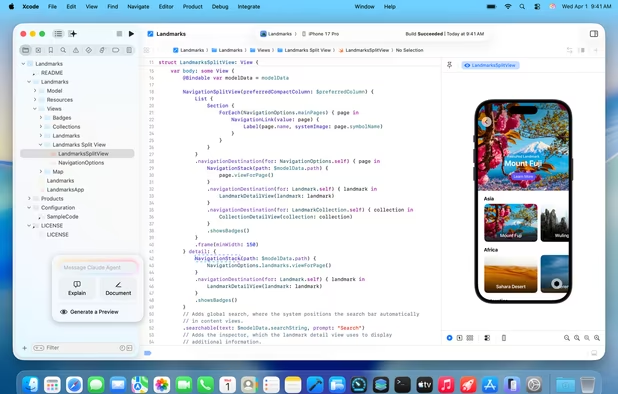
  5. Xcode icon
     Like

    Xcode 14 includes everything you need to develop, test, and distribute apps across all Apple platforms. Leverage the simplicity and power of Swift and SwiftUI with a new multiplatform app experience, code faster with enhanced editor features, and start testing and deploying from...
    Cost / License

    • Free
    • Proprietary

    Application types

    Platforms

    • Mac
    Xcode screenshot 1
  6. Dash is an API Documentation Browser and Code Snippet Manager. Dash stores snippets of code and instantly searches offline documentation sets for almost any API you might use. You can even generate your own docsets or request docsets to be included.

    Cost / License

    • Paid
    • Proprietary

    Application type

    Platforms

    • Mac
    Dash for macOS screenshot 1
    Dash for macOS screenshot 1
    Dash for macOS screenshot 2
  7. MAMP icon
     Like

    MAMP installs a local server environment in a matter of seconds on your computer. It comes free of charge, and is easily installed. MAMP will not compromise any existing Apache installation already running on your system.

    Cost / License

    • Freemium
    • Proprietary

    Application type

    Platforms

    • Mac
    • Windows
    MAMP screenshot 1
    MAMP screenshot 1
    MAMP screenshot 2
    +2
    MAMP screenshot 3
No comments so far, maybe you want to be first?
Gu