The tools I use for developing websites in 2018

Here is a non-exhaustive list of the tools I use for developing websites.

Paul
Paul List by Paul , last updated 
Copy a direct link to this comment to your clipboard
  1. TextMate icon
     Like

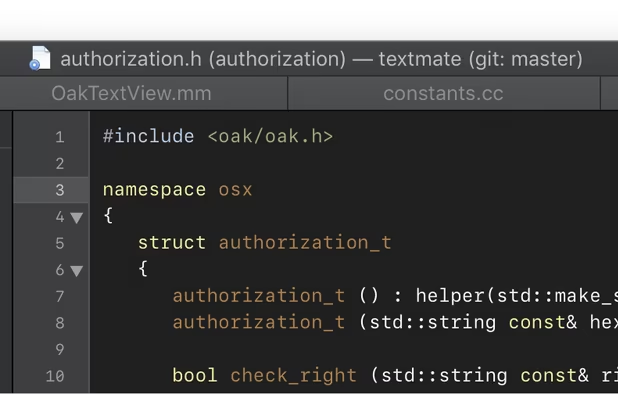
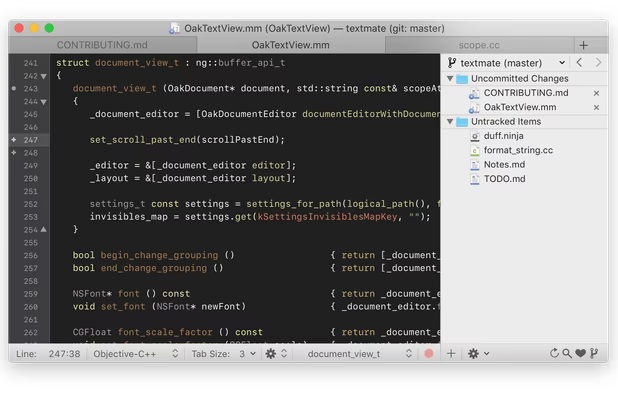
    TextMate has been my editor of choice since I can remember. It's a free and open source text editor since version 2.0. It is updated very regularly (every 5-7 days for nighty builds). It is extremely light and fast and has a simple and ergonomic graphical interface. It is an IDE that allows you to develop in almost any language (both front-end and back-end) and to which you can add many extensions thanks to its system of bundles and snippets. A tool that I am therefore not ready to give up for the moment!
    Cost / License

    • Free
    • Open Source

    Application types

    Platforms

    • Mac
    TextMate screenshot 1
    TextMate screenshot 1
  2. Sometimes, when I want to change for something with more built-in functionalities, themes, and add-ons or when I'm not working on a macOS icon macOS computer, I use Sublime Text 3. I know all the cool kids are using Atom icon Atom or Visual Studio Code icon Visual Studio Code nowadays, but when speed and performances are important to you, Sublime Text still is way ahead of its competitors.

    Cost / License

    • Freemium
    • Proprietary

    Application types

    Platforms

    • Mac
    • Windows
    • Linux
    Sublime Text screenshot 1
    Sublime Text screenshot 1
    Sublime Text screenshot 2
    +2
    Sublime Text screenshot 3
  3. Cyberduck icon
     Like

    I've used Transmit icon Transmit for a long time, but now, I'm using Cyberduck since it's free and open-source and has all the features I need from an FTP/SFTP client. I know lots of people are using FileZilla icon FileZilla but I've never been able to use it in the long run because of its terrible UI and security issue about storing unencrypted passwords.

    Cost / License

    • Freemium
    • Open Source

    Application types

    Platforms

    • Mac
    • Windows
    Cyberduck screenshot 1
    Cyberduck screenshot 1
    Cyberduck screenshot 2
    +1
    Cyberduck screenshot 3
  4. DPLOY icon
     Like

    I also had the opportunity to test DPLOY which is particularly useful if you are using Git icon Git. It's a command-line tool that allows you to deploy only the latest changes, comparing the version on the server with your Git repository. It is finally quite similar to the synchronization function of Transmit, but faster, more stable, free and open-source!

    Cost / License

    • Free
    • Open Source

    Application type

    Platforms

    • Mac
    • Windows
    • Linux
    • BSD
    • Node.JS
  5. OpenSSH icon
     Like

    Nowadays, I mainly use SSH/OpenSSH when connecting to a server to upload, edit or delete files. It's way quicker and safer than FTP and since I already spend lots of time in the terminal, it's pretty handy.

    Cost / License

    • Free
    • Open Source

    Application type

    Platforms

    • Mac
    • Windows
    • Linux
    • iPhone
    • BSD
    • Cygwin
    • Haiku
  6. CodeKit icon
     Like

    I also use Codekit for most of my web projects, which is a bit like the Swiss developer's knife. It makes it possible to compile many languages (Less, Sass, Jade...) and has very useful functions such as the auto-prefixer, live reload and live preview, image optimization, and many others... It is one of the indispensable tools that I would find it difficult to do without today. Sorry, Windows and Linux users but it's only available for macOS icon macOS.

    Cost / License

    • Paid
    • Proprietary

    Application type

    Platforms

    • Mac
    CodeKit screenshot 1
  7. Gulp.js icon
     Like

    Gulp is a task runner, i. e. it is capable of running scripts in your place alone like a big boy. These tasks depend on your goodwill and can be very varied: • simple operations such as minifying or concatenating CSS or JavaScript, • the creation or deletion of folders or files (possibility to create a project from scratch), • optimization, image compression, • the creation of a local server allowing testing on multiple devices at the same time, • the simulation of phantom browsers designed to browse and test page display regressions, etc. It has some similar features with Codekit so choose one or the other but don't use both at the same time, it'd be pretty useless.

    Cost / License

    • Free
    • Open Source

    Platforms

    • Node.JS
    • Self-Hosted
  8. Git icon
     Like

    Well, what about Git? It's a decentralized version management software and I hope you're using it if you're developing websites or apps in 2018. It allows and encourages you to have multiple local branches that can be entirely independent of each other. The creation, merging, and deletion of those lines of development takes seconds.

    This means that you can do things like:

    • Frictionless Context Switching. Create a branch to try out an idea, commit a few times, switch back to where you branched from, apply a patch, switch back to where you are experimenting, and merge it in. • Role-Based code lines. Have a branch that always contains only what goes to production, another that you merge work into for testing, and several smaller ones for day to day work. • Feature Based Workflow. Create new branches for each new feature you're working on so you can seamlessly switch back and forth between them, then delete each branch when that feature gets merged into your main line. • Disposable Experimentation. Create a branch to experiment in, realize it's not going to work, and just delete it - abandoning the work—with nobody else ever seeing it (even if you've pushed other branches in the meantime).

    Cost / License

    • Free
    • Open Source

    Application type

    Platforms

    • Mac
    • Windows
    • Linux
    • Android
    • iPhone
    • Chrome OS
    • Android Tablet
    • BSD
    • Linux Mobile
    • Haiku
  9. GitHub icon
     Like

    GitHub is a web-based hosting service for projects that use the Git icon Git revision control system. The site provides social networking functionality like feeds, followers and the network graph to display how developers work on their versions of a repository.

    Cost / License

    • Freemium
    • Proprietary

    Platforms

    • Mac
    • Windows
    • Online
    • Android
    • iPhone
    • Android Tablet
    • iPad
    Homepage
    Organization profile view
    Repository Homepage
    +6
    Issues
  10. Google Chrome Canary is an early-release, experimental version of the famous browser and is aimed at web developers so that they can work with the only search engine without losing the original version of Chrome. This allows them to try out the different features and run both browsers at the same time with a different configuration. Google says: "be forewarned: it's designed for developers and early adopters, and can sometimes break down completely".

    Cost / License

    • Free
    • Proprietary

    Application type

    Platforms

    • Mac
    • Windows
    • Android
  11. Grav icon
     Like

    Grav is an easy to use, yet powerful, open-source CMS that requires no database. In a nutshell, installing Grav is a matter of unzipping the file. It is fast, has sophisticated caching, and a light footprint for optimal performance. Content is just simple markdown files in folders, with no complicated databases to deal with. A powerful API and extensive hooks allow for plugins to extend Grav. Flexible Twig templating allows easy realization of your designs. It's what I use for most of my web projects.

    Cost / License

    • Free
    • Open Source

    Platforms

    • Self-Hosted
    • Cloudron
    The dashboard
    The basic folder structure is self-explaining
    Stats
  12. iTerm2 icon
     Like

    iTerm2 is an open source replacement for Apple's Terminal icon Terminal. It's highly customizable and comes with a lot of useful features. If you want more details about what plugins, theme, etc. I use, you can take a look at this list I made a few weeks ago.

    Cost / License

    • Free
    • Open Source

    Application type

    Platforms

    • Mac
    By Itself
    Autocomplete
    Split Panes
    +9
    Paste History
  13. Stack Overflow, part of Stack Exchange icon Stack Exchange, is a free, community-driven, reputation-based Q & A site for computer programmers. In short, this is the website I spend most of my time on when I'm developing a website and need help with anything and everything.

    Cost / License

    • Free Personal
    • Proprietary

    Application type

    Platforms

    • Online
    • Android
    • iPhone
    Main Page

I hope this list will help you. Feel free to hit me up on Twitter if you need anything or just want to talk.

No comments so far, maybe you want to be first?
Gu