Apps tagged with 'mac-optimization'

All apps in Apps tagged with 'mac-optimization' category. Use the filters below to narrow down your search. 
Copy a direct link to this comment to your clipboard
  1. DiskCleanKit icon
     1 like

    Clean junk, free up space, and speed up your Mac in one touch.

    Cost / License

    • Freemium
    • Proprietary

    Platforms

    • Mac
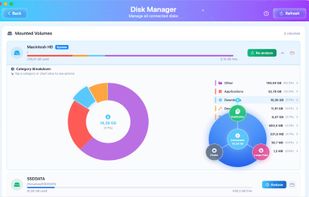
    Disks Manager to manage all your system and external disks, quick links to features for resolve your disk spaces issue
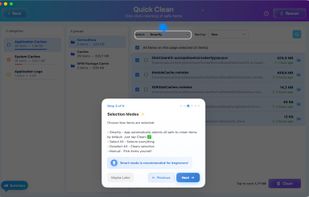
    Guide for smart selection feature
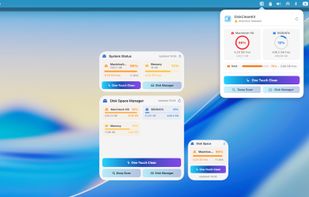
    Desktop and Menubar widgets
    +7
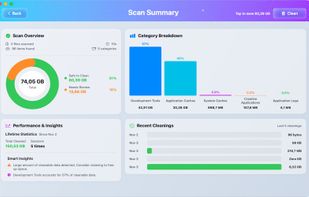
    Scan summary
  2. JENI icon
     Like

    JENI speeds up and stabilizes your Mac or PC with one small easy to run program by cleaning, repairing, and resetting core system components and overwriting deleted content, with custom reports and no subscriptions and no ads.

    Cost / License

    • Paid
    • Proprietary

    Platforms

    • Mac
    • Windows
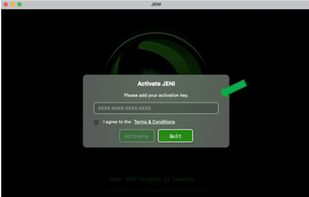
    MAC version step 1: On first launch JENI shows Activation. Copy your license key from your order page or email. Paste it into the field. Check the Terms & Conditions box. Click Activate. Your JENI for Mac unlocks and is ready to use.
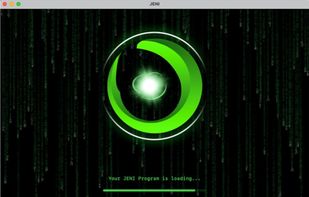
    MAC version step 2: After you enter your Mac admin password, JENI starts automated maintenance. A loading screen appears while tasks are prepared. It scans, cleans, and optimizes in the background. No action needed—just let JENI finish.
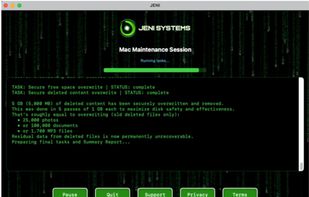
    MAC version step 3: JENI runs a full maintenance session, averaging ~5 minutes. You’ll see live updates as it securely overwrites free space and removes deleted data. Example: 5 GB permanently erased. Multiple overwrite passes maximize safety. Progress messages show the cleanup scale.
    +5
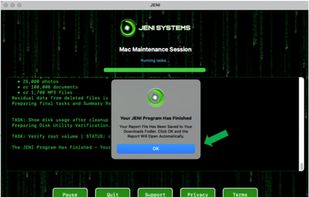
    MAC version step 4: When JENI finishes, you’ll see a confirmation. A Summary Folder—HTML report, error log, and console log—is saved to Downloads. Click OK to open it and review exactly what was cleaned, overwritten, and verified during the session.