

WSRToolkit
Text Macros: easily create boilerplate macros that inserts blocks of text at a single voice command. For example, at the end of my letters I say, "Sign off," and my name, company name and web site are inserted.
Cost / License
- Paid
- Proprietary
Platforms
- Windows
WSRToolkit
Features
- Extensible by Plugins/Extensions
- Speech Recognition
Tags
- os-utilities
WSRToolkit News & Activities
Recent activities
WSRToolkit information
What is WSRToolkit?
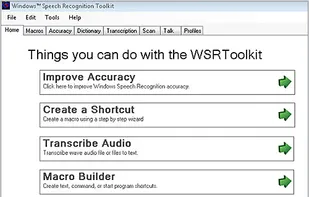
Text Macros: easily create boilerplate macros that inserts blocks of text at a single voice command. For example, at the end of my letters I say, "Sign off," and my name, company name and web site are inserted. Command Macros: allow you create step by step macros that utilize keyboard combinations. For example, I say, "Import Orders" and the macro executes Alt+f for the file menu, then "U" for Utilities, then "I" for Import etc. Transcription: reads .WAV files from a digital recorder and transcribes it to text. This is meant to be used by the person who has a personal user profile and dictates as they would in front of the computer using good enunciation and punctuation. It is not meant to transcribe multiple voices from a meeting. The digital recording file must be a high quality .WAV file (not compressed). You can test before ordering by playing your .WAV file in Windows Media Player. If it does not play in Windows Media Player, it will not transcribe to text. Accuracy: allows you to select the text of your choosing and read it to the system. This trains the 'Acoustic Model' of your speech profile to make it more likely your words will appear according to your voice and style of pronunciation. Dictionary: provides an easy way to add words or phrases to your personal speech dictionary. Use the Manage Words function to prevent a word from being recognized or to edit a word or phrase you've added. Scan: parses personal MS-Word and Text documents of your choosing to increase dictation accuracy. It finds the context within which you use words and improves the likelihood these words will appear accurately. Professionals like Physicians and Lawyers should use this feature to add their reports etc.