


WhosWho
Like
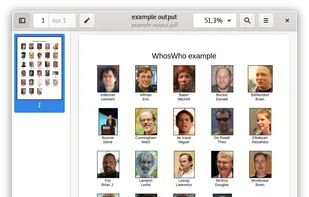
WhosWho helps creating PDF documents with people pictures and corresponding name, also called "who's who", "yearbook" or "facebook".
Cost / License
- Free
- Open Source (GPL-3.0)
 France
 EU
EUPlatforms
- Linux
- Flathub
- Flatpak

Features
Properties
- Privacy focused
Features
- Import CSV Data
- No registration required
- Ad-free
- Works Offline
- No Tracking
- Export to PDF
- Gtk
Tags
WhosWho News & Activities
Highlights All activities
Recent activities

WhosWho information


No comments or reviews, maybe you want to be first?
What is WhosWho?
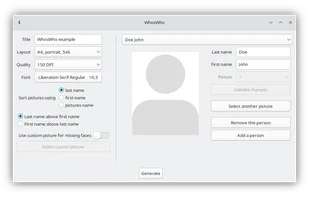
Create PDF documents with people pictures and corresponding name, also called "who's who", "yearbook" or "facebook". From a set of pictures and names, WhosWho creates a PDF document with faces and corresponding names, as used in schools. WhosWho works completely offline, and tries to make things as simple as possible for the user:
- Pictures can be automatically cropped to keep only the person's face.
- If you have a ODS/XLSX file containing people names, just export it to CSV and WhosWho will be able to use it.
- A default picture can be used if you do not have a person's picture.
- Font can be customized.
- Multiple sheet layouts are available, each one in 150 and 300 DPI:
- A4, portrait, 4x5
- A4, portrait, 5x6
- A4, portrait, 6x6
- A4, landscape, 6x4
- A4, landscape, 7x4
- A3, portrait, 6x8
- A3, landscape, 9x6