



Tenwrite
Publish Google Docs to WordPress & Blogger. Say goodbye to manual copy and paste. Instantly export your Google Docs content to WordPress and Blogger with perfect formatting.
Cost / License
- Subscription
- Proprietary
Platforms
- Online
- Software as a Service (SaaS)


Tenwrite
Features
Properties
- Lightweight
- Privacy focused
Features
- Ad-free
- No Coding Required
- Support for MarkDown
- Blogger
 Google docs integration
- Content Management
- Export to HTML
Tags
Tenwrite News & Activities
Recent activities
Tenwrite information
What is Tenwrite?
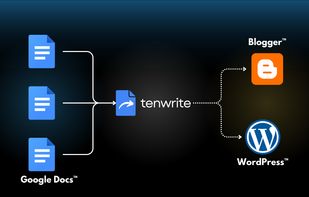
Tenwrite is a Google Docs add-on that allows users to export and publish their content directly from Google Docs to WordPress or Blogger, while maintaining perfect formatting.
? Features:
? Google Docs Integration Tenwrite add-on is integrated with Google Docs. Export & publish your Google Docs to your WordPress & Blogger sites instantly without leaving Google Docs. No additional tools required.
? WordPress Integration Tenwrite is integrated with WordPress. Publish Google Docs to your WordPress sites instantly with perfect formatting. Read how to publish Google Docs to WordPress.
? Blogger (Blogspot) Integration Tenwrite is integrated with Blogger (Blogspot). Publish Google Docs to your Blogger (Blogspot) sites instantly with perfect formatting. Read how to publish Google Docs to Blogger.
? Maintain Perfect Formatting Tenwrite will keep the same formatting, styling, and structure of your Google Docs content on your published posts on WordPress & Blogger (Blogspot).
? Image Support Tenwrite add-on will transfer the optimize and transfer the Google Docs images to your blog post on WordPress & Blogger.
? Search Engine Optimization Easily add important data like - post title, description or excerpt, labels, tags & categories to your posts to improve the ranking of your posts on Google & Bing.
? Version History Use the built-in Google Docs' version history feature to keep track of all the changes to your posts. Never lose your work again.
? Post Categorization Add Category & Tags in WordPress posts or Labels in Blogger (Blogspot) posts to easily organize your posts.
? Bulk Export Publish multiple Google Docs to WordPress & Blogger (Blogspot) using the bulk-export feature of Tenwrite.
? Schedule Posts Add Category & Tags in WordPress posts or Labels in Blogger (Blogspot) posts to easily organize your posts.
? Advanced Options Use the advanced options to cleanup and format your posts as per your need.
🧩 How to Publish Google Docs to WordPress & Blogger
Use the Tenwrite add-on to publish content in 3 steps.
1?? Step 1: Install the Tenwrite add-on.
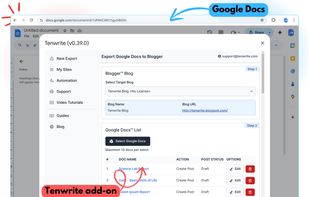
2?? Step 2: Launch the add-on and select the Google Docs you want to export.
3?? Step 3: Click on Start-Export button.