


Raven Reader
Offline ready desktop RSS Reader without any distractions.
The last version (1.0.80) is from June 2023, and the GitHub repository has been archived by the owner on Sep 28, 2023.

Raven Reader News & Activities
Recent News
Recent activities
 Sangkwun added Raven Reader as alternative to Dagiest
 linjapyc added Raven Reader as alternative to SignalHub
 hamsajama86 added Raven Reader as alternative to Canopy Reader
 ychclone added Raven Reader as alternative to Zephyr RSS
 POX added Raven Reader as alternative to Rss Ninja
 Maoholguin added Raven Reader as alternative to Glean
 POX added Raven Reader as alternative to Luli Reader
 POX added Raven Reader as alternative to Quick RSS
 smoklj6rf added Raven Reader as alternative to FeeDings!
 ThunderPhoenix added Raven Reader as alternative to Feed Fabrik


Featured in Lists

Alternatives to Google products and services but also privacy focused projects. List of apps and programmes I either …

A list with 14 apps by ferfp without a description.

A list with 83 apps by seb720p without a description.
What is Raven Reader?
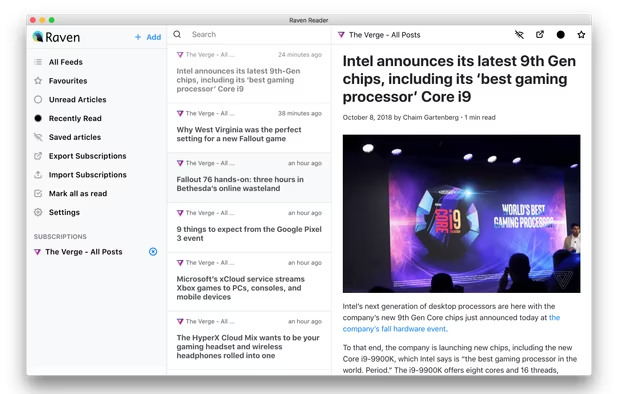
Offline ready desktop RSS Reader without any distractions. One thing Raven has right from the off is its look: it’s clean, with ample spacing, and isn’t crowded up by buttons and toolbars. Raven uses a three-pane layout: On the left is a sidebar listing RSS feed sources and a slate of filter options, including “All Feeds”, “Recently Read” and “Unread only”. In the middle is the “article list” showing the article headline, site name, publish date and an easy-to-spot site favicon. On the right is the “content” area where a plain-text version of each article is presented. The size of the first two columns isn’t adjustable but the width of the reading space can be made wider or more compact depending on your needs.
Adding feeds is easy: click the bold blue add button, tap in a site URL and Raven will auto-detect any available feeds. Helpfully, when adding feeds you have the option to change the site name/label too, handy if you only subscribe to specific sections of a website. Alas, you can’t rename feeds once added, or adjust their order once added.
Features:
- Full Article Read
- Subscribing to newsfeed
- Marking as read/unread
- Marking as favourite
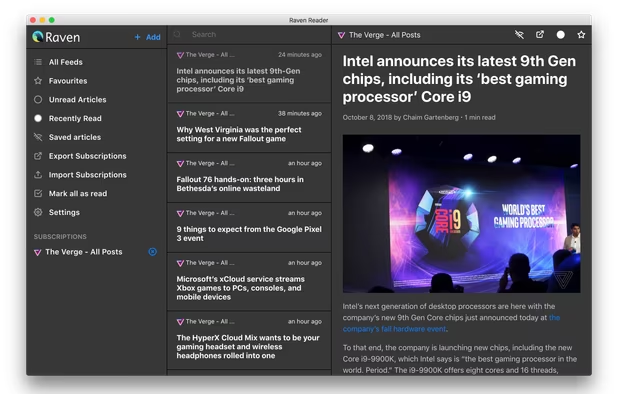
- Dark mode
- Configurable cron job for refresh interval of feeds
- Minimize app to tray and run in the background
- Open article link in external browser
- Responsive
- Exporting feed in OPML format
- Importing feeds
- Offline reading
- Keyboard Shortcuts
- Sidebar count
- Text size configuration
- Text font style configuration (Currently has Playfair Display, Muli, Open Sans and Roboto Slab)
- Supports categorizing of the feeds.
- macOS touch bar shortcuts
- Integration with read it later apps: Pocket, Instapaper
- Podcast support. Subscribe to the podcast RSS feed and listen within the app.
- Accessibility Friendly
- Feedbin integration
Raven Reader information
Developed by
 Hello Efficiency Inc.
 Licensing
Open Source (MIT) and Free product.Written in
Rating
Average rating of 3Alternatives
233 alternatives listedSupported Languages
- English

AlternativeTo Category
News & BooksGitHub repository
- 2,814 Stars
- 225 Forks
- 98 Open Issues
- Updated (Archived)


Comments and Reviews
It's simple and open-source. The UI is clean and nicely dark. This is a good basic software, but it's not without its flaws.
At times, it would forget your latest read entries or a feed would refuse to be added.
I checked back the app and where it was for sale at $10/yr before it's now free but it also now doesn't work... Adding feeds only works 1 out of 2 times and reloading the app will make your previously added feeds disappear (as in, all of them). What a shame, Moved on to Fluent Reader
Hi there,
Thanks for the review. Just curious can you send the feed that didn't work for you? So that we can look into fixing it.
@mrgodhani On Github, your account is the owner / creator of the Raven Reader app. Is this why you have downvoted my honest review of the app? I am not sure that you are open to further honest feedback and which feed did or did not work. Best.
"The last version (1.0.80) is from June 2023, and the GitHub repository has been archived by the owner on Sep 28, 2023."
I like functionality of Raven Reader, it has all I need to read rss. But on Ubuntu AppImage version I don't like UI - no options to resize window, or maximize it, so bottom elements of interface not applicable for using. Non usable on Ubuntu (maybe on other distro app is good as on screenshots, but i didn't try yet)
Not bad. The operation is lightweight and comfortable. However, the range of customization is too narrow. (width of columns, date format, etc.)
This is a great reader and also helps me to slowly transition all my apps from mac to linux. :)