



QuickKeys
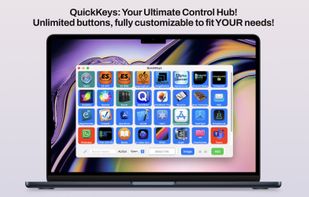
QuickKeys features a user-friendly interface that lets you control your Mac effortlessly. No more handling multiple programs and windows. Everything is just a tap away, tailored to fit your personal style and workflow.
Cost / License
- Pay once
- Proprietary
 EU
EUPlatforms
- Mac

QuickKeys
Features
Properties
- Privacy focused
- Lightweight
Features
- No Coding Required
- No registration required
- No Tracking
- Works Offline
- Dark Mode
- Ad-free
- Application Launchers
- Workflow
- Workflow Automation
Tags
- Automation
- control-panel
QuickKeys News & Activities
Recent activities
QuickKeys information
Developed by
 Wicher B Donga
 Licensing
Proprietary and Commercial product.Pricing
One time purchase (perpetual license) ranging between $29 and $30.Alternatives
0 alternatives listedSupported Languages
- English
What is QuickKeys?
Enhance Your Mac Workflow with QuickKeys: The Ultimate Control Solution
Experience QuickKeys, the perfect tool for transforming and streamlining your Mac interactions. Eliminate screen clutter and messy workflows—QuickKeys centralizes all your needs in one sleek application, making it simple to master your environment. Whether you're a podcaster, creative pro, or efficiency enthusiast, QuickKeys is crafted just for you.
Seamless and Intuitive Management
QuickKeys features a user-friendly interface that lets you control your Mac effortlessly. No more handling multiple programs and windows. Everything is just a tap away, tailored to fit your personal style and workflow.
-
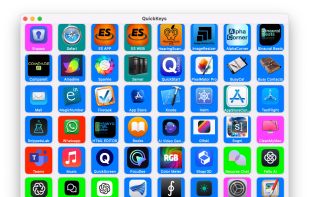
Customizable Buttons: Create endless buttons tailored to your tasks. Launch apps, start calls, or open files with ease. Every function is just a button away.
-
Tailored Layouts: Customize your QuickKeys interface to suit your workflow. Use custom text, logos, and colors for each button, making your control hub both functional and stylish.
Optimize with Touch Screens
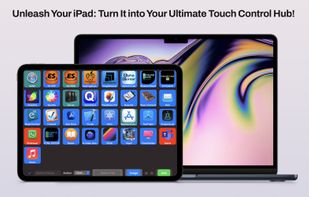
Have a touch screen like a Wacom tablet or iPad? Turn these devices into dynamic control centers with QuickKeys. Enjoy tactile management of your Mac, blending elegance and efficiency seamlessly.
Ideal for Professionals, Streamers, and Organizers
-
For Professionals: Simplify work and meetings. Access all you need with a single press, keeping your focus sharp.
-
For Streamers: Effortlessly open files in studio settings while streaming, maintaining your creative momentum uninterrupted.
-
For Organizers: Love structure? QuickKeys provides neatness. Create shortcuts for apps, files, or tasks, keeping your workspace tidy. Control your Mac entirely from QuickKeys.
Backup and Recovery for Security
Protecting your custom setup is vital. QuickKeys offers dependable backup and recovery features, safeguarding your personalized interface. If anything goes awry, restore your setup in moments—stress-free.
Join the QuickKeys Community
Choosing QuickKeys means embracing a community devoted to productivity enhancement. Share customizations, exchange tips, and explore innovative ways to utilize QuickKeys for both personal and professional endeavors.
Download QuickKeys Now!
Embark on a journey to a streamlined Mac experience. Download QuickKeys today and see how it can redefine your work and leisure time. Experience the straightforward control and flexibility QuickKeys brings right to your fingertips.
Transform Your Mac with QuickKeys
Unlock your Mac’s full potential. QuickKeys is here to optimize your workflow, boost productivity, and seamlessly transform your environment.
Ready to evolve? Step into the future of Mac control with QuickKeys—a revolutionary tool for all!
