


PhotonCam
Like
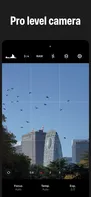
PhotonCam offers a professional-level camera experience with the following features:
+4
Cost / License
- Pay once or Subscription
- Proprietary
Platforms
- iPhone
- iPad

PhotonCam
Like
Features
Properties
- Lightweight
- Privacy focused
Features
- Ad-free
- No Tracking
- Dark Mode
- No registration required
- Works Offline
- Extensible by Plugins/Extensions
- RAW Photo Editors
- Non Destructive Editing
- Photographic filters
PhotonCam News & Activities
Highlights All activities
Recent activities
No activities found.
PhotonCam information
No comments or reviews, maybe you want to be first?
Post comment/reviewWhat is PhotonCam?
PhotonCam offers a professional-level camera experience with the following features:
- Capture photos using ProRaw and 48MP on your high-end iPhone. You can also use manual camera controls to capture the perfect shot.
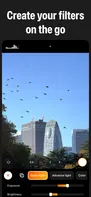
- Choose from a variety of built-in filters for use during capture or photo editing.
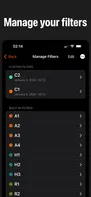
- Create your own filters using the provided tools, in addition to the built-in options.
- Utilize ACR-level tools to edit photos or filters, including control over lighting, color grading, color mixing, and various other effects.
- As a professional photographer, you can edit your photos and create a Lookup Table Cube using desktop software like Photoshop. You can then import it as a filter, allowing you to shoot in your unique style.
- Import photos from your camera to edit and export using the aforementioned built-in tools.
- Add a date stamp to your photos to create a film-look effect.
You must have a subscription or permanent purchase to use the full features of the app. For new uses, you will have a 3-days free trial and you can cancel any time.
Privacy policy: https://juniperphoton.dev/photoncam/privacy Terms of Use: https://www.apple.com/legal/internet-services/itunes/dev/stdeula/
