


Photokey 8 Pro
Photokey 8 Pro is a professional software for chroma key photos.
Cost / License
- Freemium (Pay once)
- Proprietary
Platforms
- Windows
- Linux


Photokey 8 Pro
Features
- Chroma Key / Green Screen
Tags
- Photo Editing
- photos
- fxhome
Photokey 8 Pro News & Activities
Recent activities
Photokey 8 Pro information
What is Photokey 8 Pro?
The world's leading green screen software.
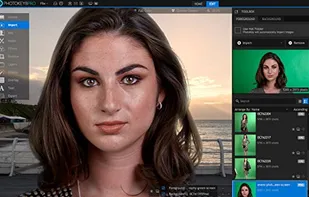
Shooting with green screen has never been simpler. PhotoKey 8 Pro analyzes your photos and instantly switches out the green screen for a brand new background of your choice. Realistic light spill creates even more convincing composites; replacing unwanted spill from your green screen with the ambient lighting from your background.
Export to multiple background variations while displaying your work on a second monitor with PhotoKey’s preview mode. Ideal for attracting customers at live events and providing clients with a glimpse of the finished image.
Put your creativity front and center with PhotoKey 8 Pro. A key resource for photographers and graphic designers alike.
PhotoKey 8 Pro is brimming with advanced tools and features to create even the most advanced composites. If you’re a Photoshop master, PhotoKey integrates as a plug-in to add instant green screen removal to your toolbox.
PhotoKey 8 Pro is everything you need in one place. Layers and overlay functions help create beautiful and unique images with a vast selection of artistic filters providing total creative control on up to 16 composite layers.
Remove green screen with a click and replace with the background of your choice. Clean up trouble areas using our advanced spill suppression tools and use facial recognition to ensure natural and accurate skin tones. For added realism, PhotoKey’s light wrap tool can take some of the background ambience and cause it to bloom naturally onto the foreground.