


Phone Disk
2 likes
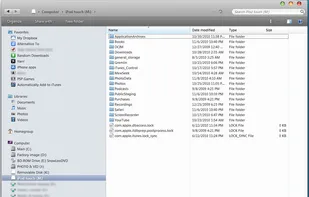
Using your standard USB cable, Phone Disk runs in the menu bar or system tray of your Mac or PC. When it finds an iPod Touch or iPhone, it seamlessly mounts it to your file system so you can directly access its files using Windows Explorer, Finder and every other program.
Cost / License
- Paid
- Proprietary
Application type
Alerts
- Discontinued
Platforms
- Mac
- Windows
Discontinued
merged with iExplorer

Features
No features, maybe you want to suggest one?
Tags
- disk-mode
- ipod-browser
- finder
Phone Disk News & Activities
Highlights All activities
Recent activities
No activities found.

Phone Disk information
Developed by
 Macroplant
 Licensing
Proprietary and Commercial product.Alternatives
9 alternatives listedSupported Languages
- English


What is Phone Disk?
Using your standard USB cable, Phone Disk runs in the menu bar or system tray of your Mac or PC. When it finds an iPod Touch or iPhone, it seamlessly mounts it to your file system so you can directly access its files using Windows Explorer, Finder and every other program.
Phone Disk is free until December 1, 2010.
Comments and Reviews
Phone Disk is definitely an interesting concept. There are plenty of iPhone file browsers out there (even the maker of Phone Disk has made an iPhone browser before), but it's uncommon to find a program that actually puts your iPhone into your computer's file system. The only other application I know that does this is Touch Drive; however, Phone Disk is free until December 1, while Touch Drive currently costs $20.
Unfortunately, Phone Disk is totally useless for me. It was designed for non-jailbroken devices only; if you have a jailbroken device, you might notice that even though Phone Disk lets you see a bunch of stuff on your iPhone that you wouldn't normally see from a desktop computer, it still doesn't show everything. In fact, Phone Disk will only show you app "media". Basically, that's your music, your podcasts, your books, etc. You can't actually see your iPhone's system files, making this pretty useless for jailbreakers.