


Orzeszek Timer
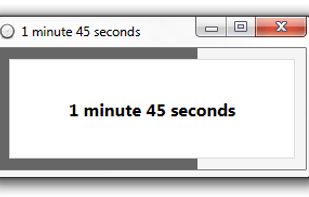
Orzeszek Timer is a basic countdown timer for Windows. Just enter a time in just about any format, and hit Enter. Orzeszek Timer will count down to zero and, optionally, notify you with an alarm.
Orzeszek Timer has been replaced by  Hourglass

Features
- Portable
- Timer
Orzeszek Timer News & Activities
Recent activities
What is Orzeszek Timer?
Orzeszek Timer is a basic countdown timer for Windows. Just enter a time in just about any format, and hit Enter. Orzeszek Timer will count down to zero and, optionally, notify you with an alarm.
Timer Overview
Orzeszek Timer is a basic countdown timer for Windows. Just enter a time in just about any format, and hit Enter. Orzeszek Timer will count down to zero and, optionally, notify you with an alarm.
Orzeszek Timer
Orzeszek Timer accepts a number of formats for specifying the time to count down:
5 – 5 minutes 2.5 – 2 minutes 30 seconds 1d 5h 3m 25s – 1 day 5 hours 3 minutes 25 seconds 1.05:03:25 – 1 day 5 hours 3 minutes 25 seconds 1 5 3 25 – 1 day 5 hours 3 minutes 25 seconds 01/01/2011 – until midnight on 1 January 2011 01/01/2011 5:00 PM – until 5:00 pm on 1 January 2011
It’s designed to be flexible in the formats that it accepts, so if you’re not sure whether it’ll accept a different format, just try it.
Orzeszek Timer can also accept the time to count down as a command line argument in any of the formats supported by the user interface. For example, “Orzeszek Timer.exe” 15 minutes 25 seconds.
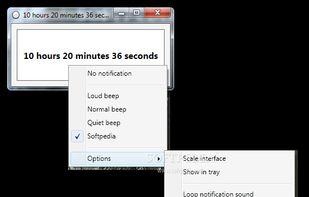
To turn the alarm on or off, or to change the alarm sound, just right-click and choose the correct setting. You can also add custom .wav files to the Sounds folder and use those instead.
Orzeszek Timer information
Developed by
 Chris Dziemborowicz
 Licensing
Open Source and Free product.Alternatives
10 alternatives listedSupported Languages
- English


Comments and Reviews
"Orzeszek Timer has been replaced by Hourglass."
Quick add notification at any time
it would be very meaningful and helpful if enabling it to add a quick note which will pop up when a timer ends, especially for a bad memory guy like me
[feedback 2] and could you please add a feature that makes it could be minimized to tray?
Very useful app, thank you!
One feature wish though: it would be nice, if you could choose to automatically start the countdown when the timer starts. Reason for this, is that on my computer (2013 Lenovo X240 i5), it takes a few seconds to start, so I switch to doing something else, and often forget to start the timer once the app has loaded.