



LoadStar
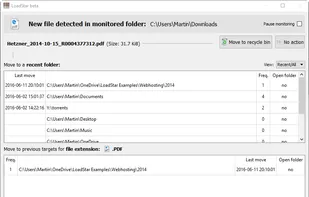
As a background application, LoadStar monitors your download folder and brings incoming files to your attention. Whenever a new file is found in that folder, LoadStar opens up a popup dialog with an intelligent selection of target folders where you can have your download moved...
Cost / License
- Free
- Open Source
Platforms
- Windows

Features
- Standalone
Tags
- Privacy Protection
- Automation
- file-monitoring
- directory-monitoring
LoadStar News & Activities
Recent activities
LoadStar information
Developed by
Martin PonweiserLicensing
Open Source and Free product.Alternatives
15 alternatives listedSupported Languages
- English


What is LoadStar?
As a background application, LoadStar monitors your download folder and brings incoming files to your attention. Whenever a new file is found in that folder, LoadStar opens up a popup dialog with an intelligent selection of target folders where you can have your download moved to (and afterwards opened) in only one click.
The more often you use LoadStar, the better it gets at predicting the right target folder for your file. This means no more tedious hunting for folders on your drives! Just install LoadStar and let it handle your downloads from now on — you will be amazed at how easy it is to keep your file system in order!
As additional feature, you can also invoke LoadStar any time to interactively batch-clean a folder with unordered files.
Typical uses:
- Handling your daily, monthly and yearly downloads.
- Saving email attachments to folders. A great example are monthly PDF invoices which have a fixed filename length, like “20160601_123456.pdf“.
- Downloading ebooks to Calibre‘s auto-add folder.
- Saving .torrent files to an auto-add folder.
- Cleaning up your download folder in one single session by moving your files to your personal folder structure.
Features:
- LoadStar is a stand-alone app with local per-user settings and database.
- Handles single and multiple new files equally well.
- By clicking the middle mouse button you can move and then open a file in one single action. Alternatively, hold (Shift) while clicking.
- A session history keeps track of your actions and allows opening target folders or retrying moves in case of errors.
- Private folders: Target folders can be marked as ‘private’ and will be shown in the popup dialog only on pressing the (Alt) modifier key .
- LoadStar is compatible with and enhances many other applications (browsers, email-clients, download utilities, etc.)
Benefits:
- Easy and quick setup
- Saves dozens of clicks in a very short time
- Intuitive, learns from your previous actions
- Free!
Comments and Reviews
The website seems to not be functional anymore.
I have moved the project's site to GitHub, so the download and information are back online!