Lightweight PDF Alternatives

Lightweight PDF is described as 'A free PDF compressor for Mac' and is an app. There are more than 50 alternatives to Lightweight PDF for a variety of platforms, including Web-based, Windows, Mac, Android and SaaS apps. The best Lightweight PDF alternative is Adobe Acrobat DC. It's not free, so if you're looking for a free alternative, you could try Sejda or Smallpdf. Other great apps like Lightweight PDF are Breeze PDF, Signature PDF, iLovePDF and Wondershare PDFelement.

Copy a direct link to this comment to your clipboard
Lightweight PDF alternatives page was last updated

Alternatives list

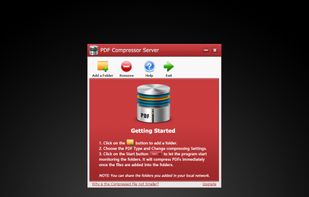
  1. Compress PDF has the capability to minimize file size of PDF documents, especially useful for those PDF files with many graphics and photos.

    Cost / License

    • Paid
    • Proprietary

    Application type

    Platforms

    • Mac
     
  2. PDF OCR provides the best and free services for PDF to Word services. It supports OCR 100 languages and converts the scanned pdf to editable docx documents. Free, safe and easy to use.

    Cost / License

    • Free
    • Proprietary

    Platforms

    • Online
     
  3. Pdf 18 icon
     Like

    pdf18.com is a free, online PDF toolkit designed to help individuals, professionals, and businesses take complete control of their documents. Whether you need to merge multiple files into one, split a large PDF into smaller sections, compress a document to reduce its size, or...

    Cost / License

    • Free
    • Proprietary

    Application types

    Platforms

    • Software as a Service (SaaS)
    • Online
     
  4. AwesomePDF icon
     2 likes

    Free PDF tools in one place. Convert PDFs to and from multiple file formats, remove pages, merge PDFs, unlock password protected PDFs and more

    Cost / License

    • Free
    • Proprietary

    Platforms

    • Online
     
  5. FileMatic icon
     Like

    Professional offline PDF compressor supporting Mac and Windows, offers up to 90% reduction with a 4-stage intelligent pipeline, batch processing, watch folders, DPI control, five presets, custom profiles, and a command-line tool for advanced automation workflows.

    Cost / License

    • Paid
    • Proprietary

    Platforms

    • Mac
    • Windows
     
  6. Convert PDF to Video easily - 18 Image Transition Effects - Add Background Music - Convert PDF to mp4.

    Cost / License

    • Paid
    • Proprietary

    Platforms

    • Windows
     
  7. PrimaPDF icon
     Like

    Prima PDF is a free online platform that provides essential PDF tools to help you work with your documents efficiently.

    Cost / License

    • Free
    • Proprietary

    Platforms

    • Online
     
  8. Moainex Taskspace is a privacy-first JPG to PDF converter that instantly processes files without storing them. It’s fast, secure, and ideal for Mac and Safari users. No login required.

    Cost / License

    • Free
    • Proprietary

    Platforms

    • Online
     
  9. Kingshiper PDF to Word Converter can handle various office document format conversions, including converting PDF to Word, PPT, Excel, HTML, TXT, and JPG; converting Word, JPG, Excel, and PPT to PDF.

    Cost / License

    • Freemium
    • Proprietary

    Platforms

    • Windows
     
  10. PDFBeast icon
     Like

    PDFBeast aims to simplify PDF editing and conversion, making it straightforward and user-friendly. PDFBeast is an ideal solution for novices unfamiliar with file editing, merging, annotating, or conversion processes, providing an easy-to-navigate platform.

    Cost / License

    • Paid
    • Proprietary

    Application type

    Platforms

    • Online
     
  11. PDF Panda icon
     Like

    Split or merge PDF documents. Reorder or remove pages. Compare PDF documents. Advanced PDF extraction (e.g. get all invoice numbers of many PDF documents at once. Everything easy with PDF Panda!.

    Cost / License

    • Free
    • Proprietary

    Platforms

    • Online
     
  12. PDF2GO icon
     2 likes

    Edit PDF files online and convert, compress, merge, split, rotate, sort or protect them in the cloud. All for free, all uploaded files will be automatically deleted after 24 hours and no restrictions in use. Service is multilingual.

    Cost / License

    • Free
    • Proprietary

    Application type

    Platforms

    • Online
     
You are at page 8 of Lightweight PDF alternatives