


Lightkey
Professional DMX lighting control. Mac style.
Cost / License
- Subscription
- Proprietary
 EU
EUPlatforms
- Mac

Features
- Support for MIDI
- DMX Led Control

- Dynamic lighting

Lightkey News & Activities
Recent activities
 OpenSourceSoftware added Lightkey as alternative to ChromaPulse

Lightkey information
Developed by
 Monospace GmbH
 Licensing
Proprietary and Commercial product.Pricing
Subscription ranging between $79 and $379 per month.Alternatives
10 alternatives listedSupported Languages
- English


What is Lightkey?
Professional DMX lighting control. Mac style.
Thanks to the Open Lighting Architecture. Whatever DMX interface you have, there’s a good chance that Lightkey supports it—simply download Lightkey for free, plug in your interface, and give it a try.
Smarthome Add smart lights to your projects and control them just like your DMX lights. Lightkey 4 controls bulbs, LED strips, smart plugs and other types of lights by Philips Hue.
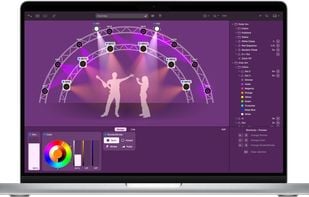
Virtual light beams Shows your lights’ real-world positions and also reflect intensity, color, focus, zoom, iris, frost, and shutter/strobe states.
Built-in stage editor The built-in graphical editor lets you recreate the stage or dance floor on the screen. Apart from your fixtures you can add shapes, trusses, and custom images.
Real-world pan/tilt locations Lightkey knows your moving light’s pan/tilt range, home position, and rotation direction. With this information it calculates the exact beam position on the stage or dance floor, so the preview always shows the fixture’s real-world position.
Effects Lightkey’s powerful effects engine makes it easy and fun to create amazing dynamic looks.
Beat control. Effortlessly sync your light show to music. Lightkey connects to your DAW, DJ app, or audio analysis software through MIDI Clock or Ableton Link. Or simply tap the beat and Lightkey will continue at the same tempo. You can adjust the speed of individual cues at any time with a Beat Multiplier.
Always in sync. Run your lighting from Ableton Live.
The unique Live Triggers feature makes it quick and intuitive to trigger lighting cues directly from Ableton Live: Simply drag cues you created in Lightkey to the Ableton Live timeline. If you’re a live performer, you can create a light show that’s perfectly in sync with the music without any manual operation during the show.
Fixture Setup An interactive assistant guides you through the entire setup process: Configure DMX output, patch your fixtures, create a visual representation of the stage. And if you ever need a fixture profile that is not in the built-in library, simply send us the DMX specs and we’ll create it for you within a few days.
Live Preview This 2D view of your lighting rig shows the current state of the fixtures with virtual light beams
Custom Control Panel Build a custom-tailored control panel with buttons and faders to control your lights during a show.
Supported USB Interfaces: • DMXking • ultraDMX Micro • ultraDMX Pro • ultraDMX RDM Pro • ultraDMX2 PRO • eDMX2 PRO • Enttec • DMX USB Pro • DMX USB Pro Mk2 • Open DMX USB • RDM USB Pro • Eurolite • USB-DMX512 • USB-DMX512-PRO • USB-DMX512-PRO MK2 • USB-DMX512-PRO Cable • Jese • DMX-TRI • RDM-TXI MK2 • Robe • Universal Interface • RUNIT WTX • Stage-Profi • USB-DMX MK2 • USB-DMX MK3 • Any Art-Net interface • Any sACN interface • ESP Net • Any ESP Net interface
Comments and Reviews
Simple to use but very powerful. Avoids the pain of legacy hardware locked DMX software.