



KEYSERV Video
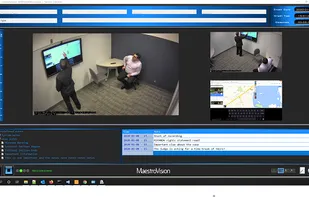
A user-friendly solution that allows the simultaneous recording of up to 4 independent audio & video sources in high-definition. Combined with our Media Library, the app offers a complete solution to record, store and retrieve all media types.
Cost / License
- Free
- Open Source
Platforms
- Windows


KEYSERV Video
Features
- Screen Recording
- Audio Recording
- Media library
- Record videos
Tags
- notes-manager
KEYSERV Video News & Activities
Recent activities
KEYSERV Video information
What is KEYSERV Video?
KEYSERV VIDEO is a user-friendly solution that allows the simultaneous recording of up to 4 independent audio & video sources in high-definition. Combined with the VEOTEK Media Library, the application offers a complete turn-key solution to record, catalog, store, and retrieve all the different media types collected.
The KEYSERV Video application has next-generation recording capabilities. Restored from the most discerning video experts in the broadcast industry, MaestroVision has leveraged its experience and expertise to provide the best recording systems.
Features: -Capacity of 4 (four) cameras and multiple microphones. -Recording is done in High Definition HD 1080p, 30 fps. -Records the audio signal perfectly synchronized with the video. -Digitizes encodes and records in standard h.264 format -A separate audio file in a standard format is created, to allow the written transcript of an interview. -A friendly user interface eases the learning curve. -Prevents unauthorized users from accessing previous recordings. -Ability to view, record and playback up to four fully synchronized independent video views (Not a picture-in-picture image). -Ability to mark or flag important video segments with descriptive notes. -Allows users to link directly to a specific point in a video on playback by selecting the descriptive note. -Allows for multi-speed playback in both rewind and fast forward. -Ability to transfer the recordings to the central location and/or copy immediately onto a CD/DVD or USB key -Includes a playback application on the USB keys or DVDs with the same interface as the recording application