

focus.exe
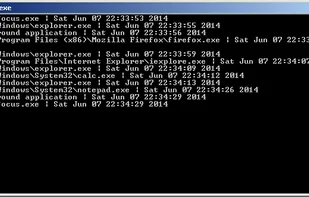
It runs in text mode and prints a line whenever a new app grabs the focus (= comes to the foreground, kicking the previous app to the background).
Cost / License
- Free
- Proprietary
Alerts
- Warning
Platforms
- Windows
Contains Trojan:Win32/Tnega!ml as detected by Windows Defender
Features
- Logging
Tags
- focus-logger
- event-log
focus.exe News & Activities
Recent activities
focus.exe information
Developed by
UnknownLicensing
Proprietary and Free product.Alternatives
1 alternatives listedSupported Languages
- English

What is focus.exe?
Did you ever got kicked out of your favorite game, video player or productivity app for an unknown reason? It was active, in the foreground, and suddenly got minimized?
The problem is easily solved if the culprit is an app that displays itself when this happens. But if only the desktop shows, without anything suspicious on it, then how to find the app causing this? I googled for some time and didn't find anything satisfying. So I decided to write my own tool.
It's really simple to use. Just download, unzip it anywhere and run the focus.exe file. No need to install. It runs in text mode and prints a line whenever a new app grabs the focus (= comes to the foreground, kicking the previous app to the background). Just let it run minimized while you're normally using your PC. As soon as you encounter the issue again, go to the focus.exe window and look at the last lines. They will tell you what app stole the focus from you.