



File Cards
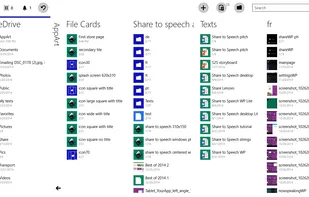
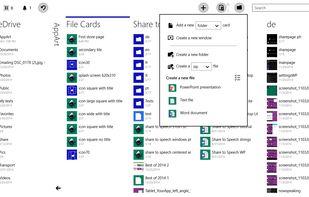
File manager with productivity in mind. Fast and fluid. See all your important folders and their contents in one view at a glance with the cards based interface. This will bring a whole new level of visibility to your computer and improve your productivity.


Both homepage and Windows store are 404.

Features
- Supports Zip files
- Supports RAR files
- Windows-explorer
File Cards News & Activities
Recent activities
File Cards information
Developed by
 Labsii
 Licensing
Proprietary and Commercial product.Alternatives
20 alternatives listedSupported Languages
- English


What is File Cards?
File manager with productivity in mind. Fast and fluid. See all your important folders and their contents in one view at a glance with the cards based interface. This will bring a whole new level of visibility to your computer and improve your productivity. It will help you to be more tide and organized. Search and filtering works across all the cards to make you find your data quickly, wherever you store it. Look through brings your view even further by showing the contents of all subfolders in the card. All classic file and folder operations like delete, cut, copy and paste, opening of folders and files, creating of compressed files and their extraction are reinvented and refreshed. As a Windows Store app that is declared not to use the Internet, it enforces the corporate level security. It runs in the Windows Store sandbox preventing it from all possibly unsafe operations, and as the app can't access the Internet itself you can rest assure that no your data will ever be leaked. To use the cloud storage services that are not natively supported like Dropbox or Google drive, install their respective desktop apps and then add local folders that they create as new cards to the app. From the author of the app Share to Speech which was part of the official Best of 2014 collection in the Store.
Official Links
There are no links for this app, or they've been disabled.